

Where to find it: OTO PACK → Operations → Inbound — Open in OTO ↗
Bins — the warehouse’s addresses
A bin is a location with a name. As the product puts it: “Bins are addresses within your warehouse, representing specific locations where products are stored or moved.” Without them, stock is “in the warehouse”, which is not an answer anyone can walk to. Bins live at OTO PACK → Configuration → Bins, with Add Bin and a bulk import.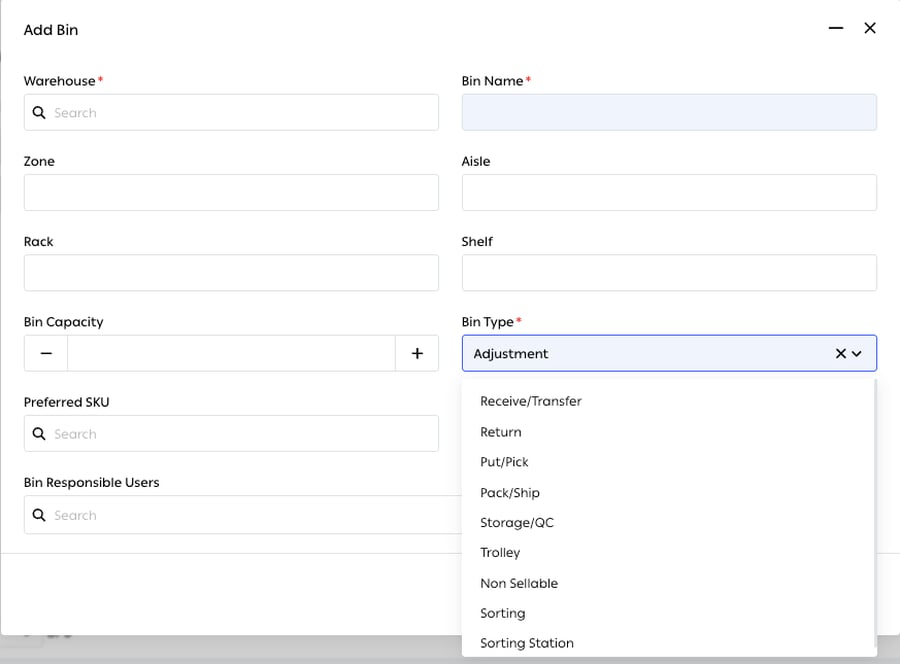
Fig. 1 — Only Warehouse, Bin Name and Bin Type are required — everything else refines the address or the rules around it.
Bin types
The type is what makes a bin behave differently from the one next to it.Zones
A zone is a larger section of the warehouse, configured at OTO PACK → Configuration → Zones with Add Zone.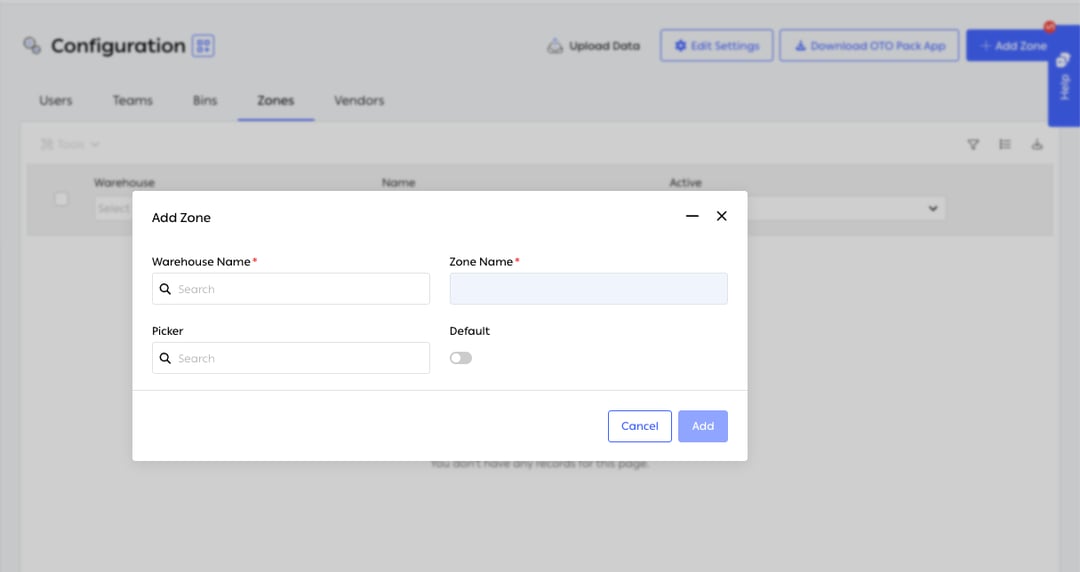
Fig. 2 — A zone is four fields — and two of them are what make zone picking work.
Bins are attached to zones from the Bins tab — select bins, then Update Zone from the tools menu. Configuration also carries Users, Teams and Vendors alongside Bins and Zones.
Receiving
Inbound orders are created and processed at OTO PACK → Operations → Inbound, and received in the app on the Inbound page. Receiving is a scan against what was expected, which is where a short or wrong delivery gets caught — while the driver is still there.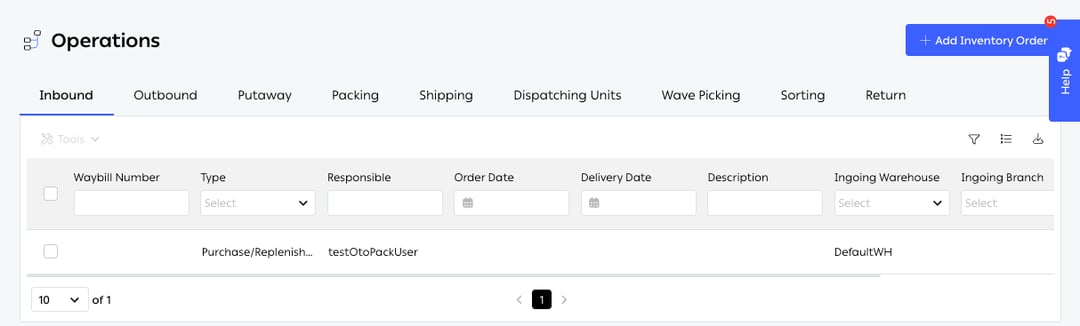
Fig. 3 — Operations is the desktop counterpart to the app, one tab per stage: Inbound · Outbound · Putaway · Packing · Shipping · Dispatching Units · Wave Picking · Sorting · Return.
Every column carries its own filter in the header row, and new receipts are created with Add Inventory Order.
Goods arriving against a purchase order come in the same way; purchase orders themselves carry Vendor, Requested By and Shipping Term, at OTO PACK → Purchase Orders.
Putaway
A putaway task is created automatically once an inbound order is processed — receiving does not end with goods on the dock, it ends with an instruction to shelve them. One can also be raised by hand from Operations → Putaway.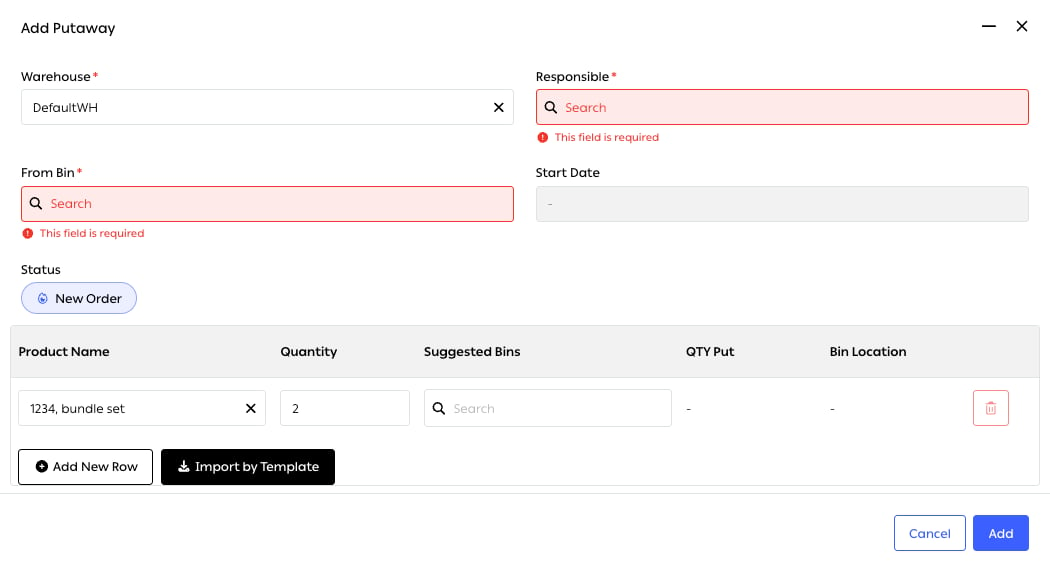
Fig. 4 — Warehouse, Responsible and From Bin are required — a putaway always has an owner and a starting location, never just a destination.
Lines are added one at a time with Add New Row, or in bulk with Import by Template for a large receipt. The task opens at status New Order.
The work itself is done either way:
A single receipt can be split across several bins, which is how a pallet of one SKU gets distributed to the pick face and the reserve at once — the QTY Put column is what keeps that honest.
Suggested bins
Putaway suggests where each item should go, from the bin’s Preferred SKU and its remaining capacity. The point is not to save a decision but to make the same decision every time: stock that lands wherever there was room is stock nobody can find twice.Replenishment suggestions
When a pick-face bin runs low, the system proposes moving stock from reserve, so picking does not stop at an empty shelf while a full pallet sits two aisles away.Easy Put
The ad-hoc counterpart: a quick transfer between any two bins, started by a person rather than by a receipt.
Reached at Menu → Put → Easy Put in the app, or the Easy Put button on the Putaway tab.
QC and stock areas
Goods that arrive damaged, fail inspection or come back as returns are put into bins that hold them out of sellable stock until someone decides. The separation is physical and recorded at once, so nothing waits in an undefined state.WMS API
Merchants running another WMS as the system of record can drive this one over the API — inbound orders and inventory updates — so OTO PACK handles execution while the external system keeps the books. The endpoints are documented in the OTO API reference.Related
- Picking methods — zones and bin layout decide how picking performs.
- Inbound inventory — GRN, gate entry and transfers.
- Inventory count — counting the bins set up here.
- Hubs Management — bins and trolleys defined per hub.