

Where to find it: OTO PACK → Inventory → Bin Inventory — Open in OTO ↗
Counting in the app
Count is an action in the OTO PACK app, reached from Menu → Count; the screen itself is titled Stock Count. It belongs to OTO PACK Advanced with bin tracking, and it is available on the mobile app only — which makes sense, because a count happens standing in front of a shelf.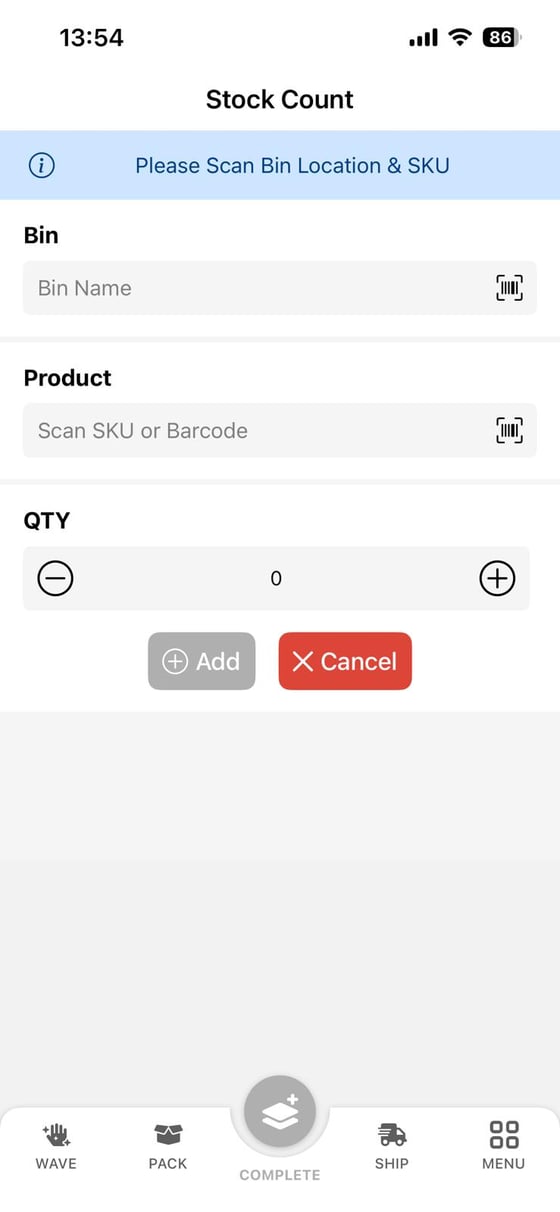
Fig. 1 — Three fields and one instruction. The counter is told what to do before they are asked for anything: “Please Scan Bin Location & SKU”.
Then Add records the line, and the center button — labelled COMPLETE on this screen — commits the count. That is what adjusts the bin to the entered quantity and logs any excess or shortfall into the Adjustment Bin. Cancel abandons the line.
Everything clears after COMPLETE and the counter starts the next bin and SKU. Scanning rather than typing is worth the habit: a count entered against the wrong SKU corrects one number by breaking another.
What to count, and how often
A full stocktake stops the warehouse. Cycle counting does the same work continuously, a slice at a time, and the slice can be chosen two ways.Blind counts
In a blind count the counter is not shown the expected quantity. They report what they see, and the system compares afterwards. The reason is human rather than technical. A counter who can see “48” on the screen and counts 47 will very reasonably assume they miscounted and enter 48 — and the discrepancy that was trying to surface goes back under. Hiding the expectation is what makes the count evidence rather than confirmation.The tradeBlind counts are slower, because a genuine miscount is not caught on the spot and has to be recounted. That cost is worth paying on the lines where you actually need to trust the number, and often not worth it on a routine sweep. It is a decision per count programme, not a setting to turn on everywhere and forget.
Damaged and expired stock
Stock that exists but cannot be sold is a different problem from stock that is missing, and it is handled by moving it rather than deleting it. Units that are damaged, expired or awaiting inspection go into bins that do not feed available inventory — Non Sellable, Return or Storage / QC. The effect is immediate and commercial: the moment a unit is moved into one of those bins, your storefronts stop offering it, because sync is quoting availability rather than physical stock. Nobody has to remember to adjust a second number. It also keeps the write-off honest. The goods are still counted, still findable and still attributable to whoever set them aside, until someone decides to dispose of them through an outbound inventory order. See Inbound and putaway for the bin types.After the count
Counts are only worth the walking if what they find gets read. Two places to look:
Once a count has been done thoroughly, Equal On Hand Inventory to Bin Inventory on the Inventory screen brings the warehouse total into line with the bins you have just verified.
Related
- Inventory tracking — the numbers a count corrects.
- Inbound and putaway — bins, bin types and the Adjustment bin.
- The OTO PACK app — where Count sits among the other actions.