

Where to find it: OTO PACK → Inventory — Open in OTO ↗
The problem it solves
Overselling and stocking out are the same failure seen from opposite sides. Sell what you do not have and you cancel an order that was already paid for; hide what you do have and you turn away a sale that was already made. Both come from the same cause — a stock number that is a guess by the time anyone reads it. The difficulty is that stock is not one number. A unit can be on a shelf and already promised to someone. It can be in the building but damaged. It can exist in a warehouse that this particular storefront does not ship from. A system that reports “47” and leaves the reader to work out which 47 it means is the problem, not the solution.Two numbers, and the gap between them
OTO INVENTORY keeps two figures for every product, and almost everything in this module is downstream of the distinction.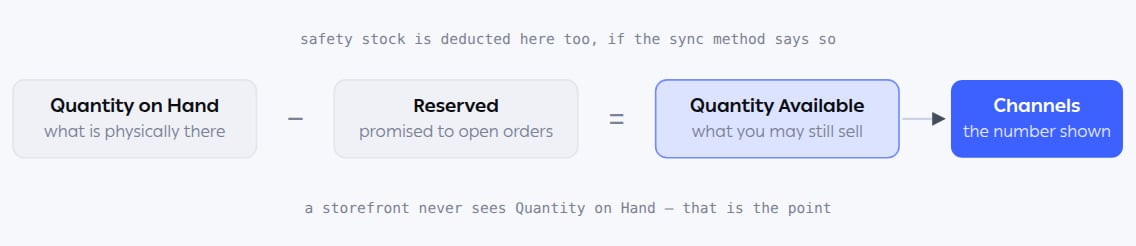
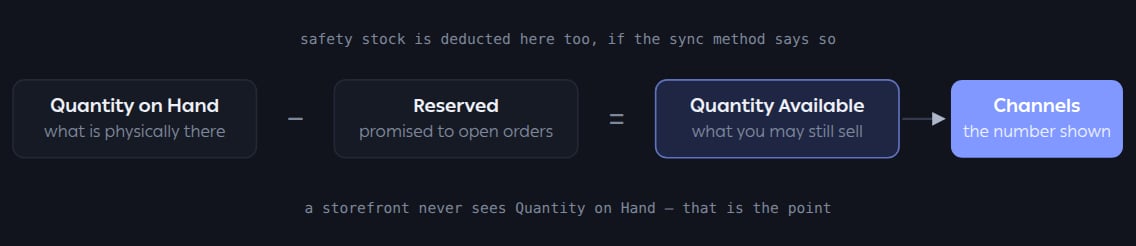
The storefront is quoted availability, not physical stock. Everything in this module exists to keep that number honest.
Where it lives
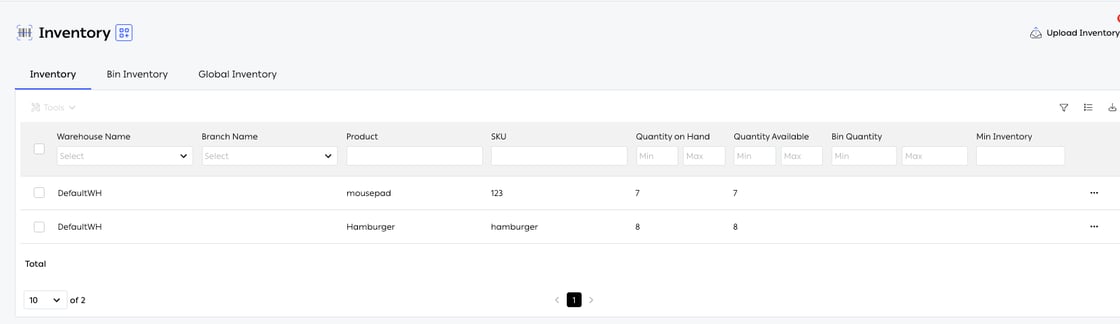
Fig. 1 — Stock by warehouse and branch. Quantity on Hand and Quantity Available sit side by side on every row, which is the whole idea made visible.
Bin-level detail is an editionTracking stock down to the bin — and therefore bin counts, bin transactions and the Bin Inventory tab — belongs to OTO PACK Advanced with bin tracking. Without it, stock is held per warehouse and branch, which is enough for many operations and considerably less to maintain.
Who runs it
Functions in this module
Inventory tracking
6 features
Inbound inventory
4 features
Inventory sync
3 features
Product configuration
7 features
Inventory counts
4 features
What it connects to
- Warehouse Management — the physical movements that change these numbers.
- Sales Channels — where availability is published.
- Order routing — routing decides which location fulfills, and stock is the constraint it works within.