

Where to find it: Settings → Management → Warehouses — Open in OTO ↗
The problem it solves
Retailers accumulate places to ship from. A central warehouse, then a second one nearer the customers, then the shops — which turn out to hold a third of the stock and be closer to most buyers than any warehouse. Then a 3PL for a market you do not want to run yourself. Each of those gets added, in most businesses, as an exception. The shops are in a different system. The 3PL sends a spreadsheet. Routing rules grow a special case per location, and the question can we fulfil this order, and from where? stops having one answer. Treating them all as hubs is what prevents that. One object, one set of settings, one place where routing looks.Three kinds, one shape
Where it lives
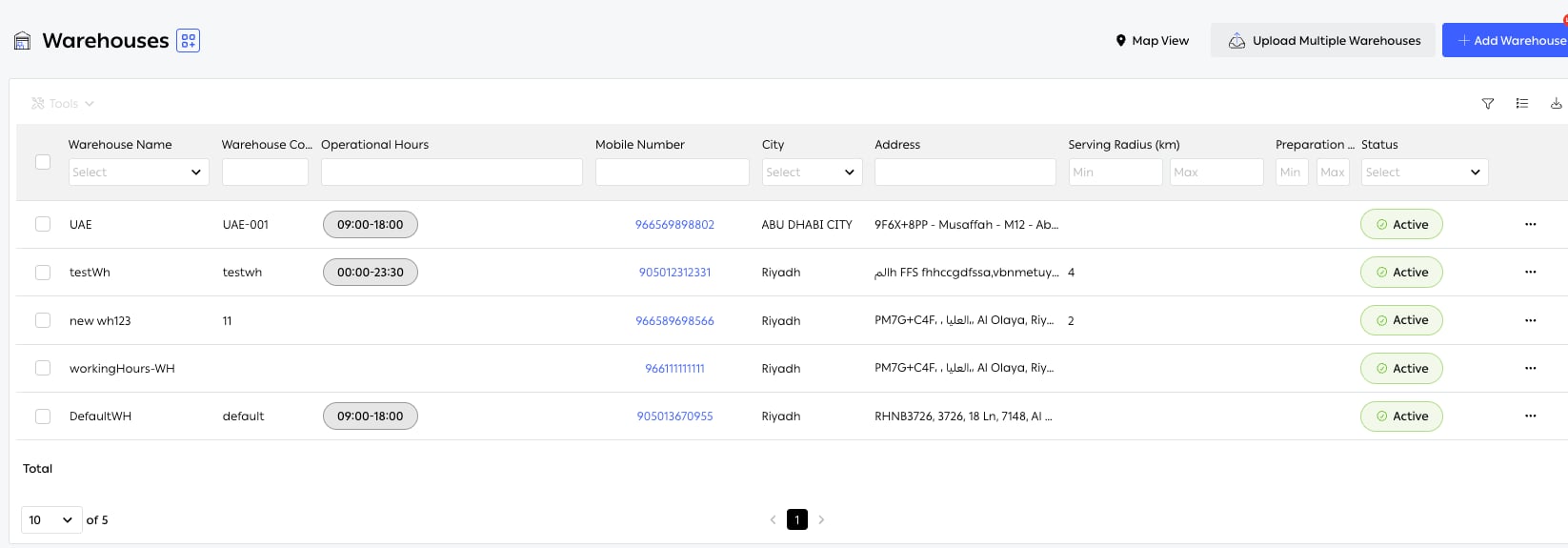
Fig. 1 — Every fulfillment location, with the hours, radius and SLA that make it usable to routing. Map View plots the same list geographically; Upload Multiple Warehouses creates them in bulk from a file.
Who runs it
Functions in this module
Hub configuration
9 features
What it connects to
- Order routing — the rules that choose between hubs.
- Warehouse Management — what happens inside one.
- Inventory tracking — stock held per hub.