

Where to find it: OTO PACK → Operations — Open in OTO ↗
The problem it solves
An order arriving at a warehouse is a question: where are these items, who fetches them, in what order, into what container, and how do we know the right things ended up in the right box? Answered on paper, the cost is walking — pickers cover miles a day — and the risk is mis-picks, which are expensive twice, once in the return and once in the customer. OTO PACK answers it with bins that have addresses, waves that group work sensibly, and a scan at every handover so that being wrong is difficult rather than merely discouraged.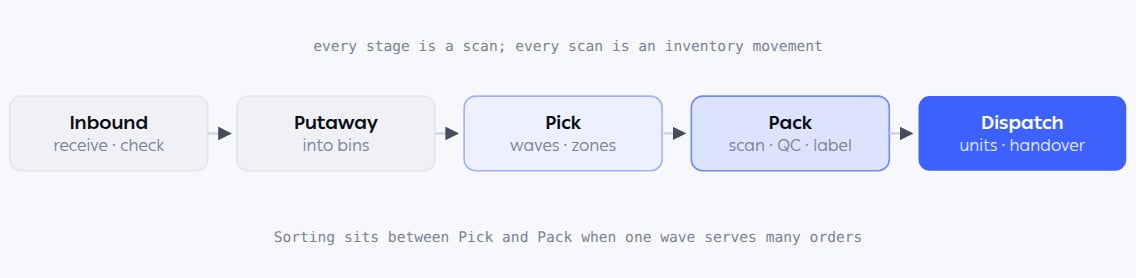
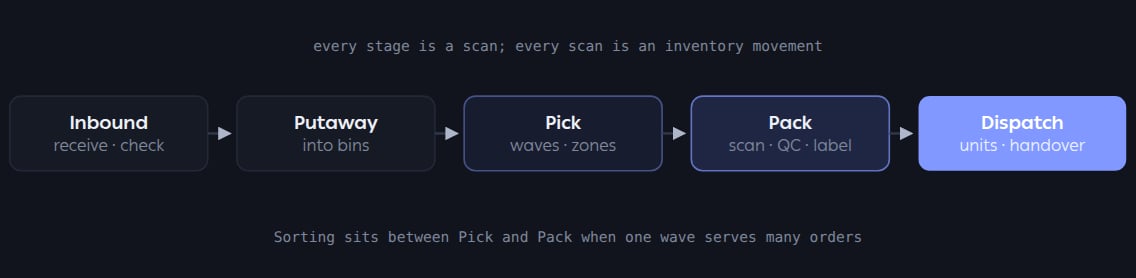
The Operations screen has a tab per stage, in roughly this order. Returns re-enter at Inbound.
Where it lives
EditionsOTO PACK comes in Basic and Advanced, alongside OTO INVENTORY. Which screens and app pages a user sees depends on the edition — zone picking, wave customization and picker-assignment automation are Advanced capabilities. Where an edition matters, the pages below say so.
Who runs it
Functions in this module
The OTO PACK app
1 feature
Picking methods
8 features
Packing and dispatch
7 features
Inbound and putaway
7 features
What it connects to
- Inventory Management — the stock these movements consume and replenish.
- Hubs Management — bins, trolleys, working hours and picking method, configured per hub.
- Order fulfillment — what a packed order becomes.
- Returns receiving — the Return tab, from the other direction.