

Where to find it: Main → Shipping → Returns — Open in OTO ↗
One form, six stages
A return is worked through a single View Return Details form rather than across several screens. A progress bar across the top names every stage and marks where this one has got to.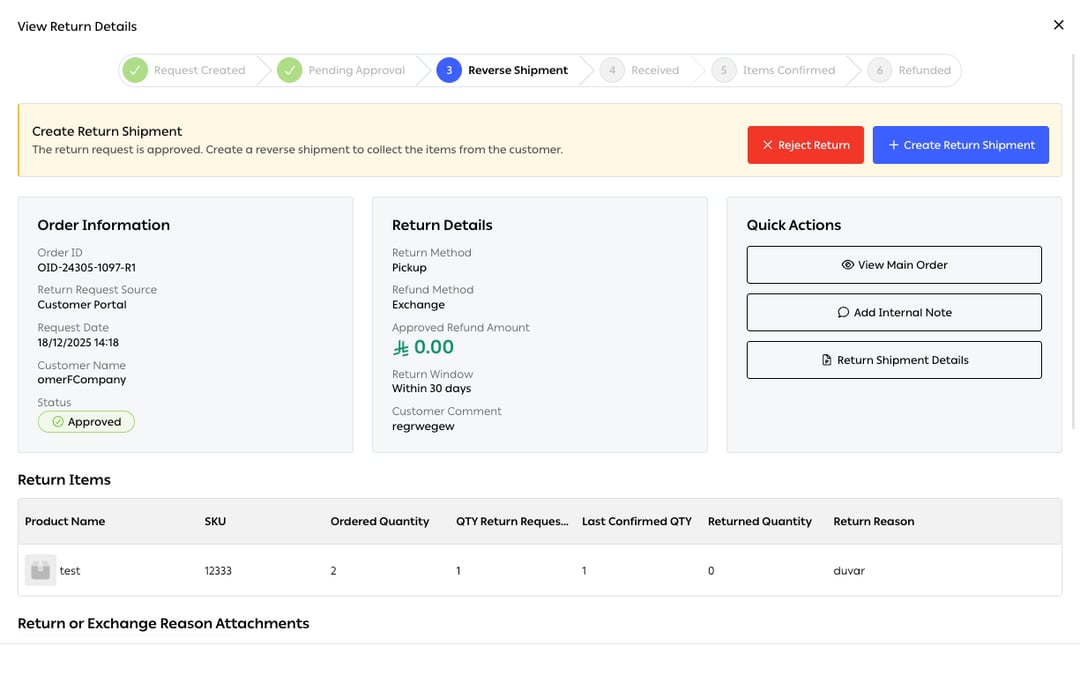
Fig. 1 — Six stages: Request Created → Pending Approval → Reverse Shipment → Received → Items Confirmed → Refunded. This return is at stage three.
What the form holds
Four quantities, not one
The Return Items table carries every number separately, per SKU:1 · Create the reverse shipment
The return label is generated inside the form. You choose the shipment option — OTO Rates or Own Rates, exactly as on an outbound order — and the destination, which can be any warehouse or branch. The Return Label (airway bill) prints from the Quick Actions menu.2 · Receive it
When the parcel arrives, the form records the Receiving Date and Time, the exact warehouse or branch that took it in, and internal notes on the physical condition of what was received. Those notes are for you rather than the customer, and they are what a refund dispute is settled with three weeks later.3 · Confirm the items
The critical step, and the one that must come before any money moves. It matches the quantity requested against the quantity actually received, and verifies the return reason the customer gave at the start against what is in the box.4 · Process the refund
Only now. The form shows the refund amount calculated by your e-commerce platform, you select the method — Money Back, Exchange or Store Credit — and confirm, which moves the request to Completed.Confirming in the warehouse
The desktop path runs from Shipping → Shipments → Returned:In the app
Return is one of the nine actions in the OTO PACK app. The operator picks the order and confirms items by scanning — or by manual selection where scanning is not possible — and inventory updates in real time. Scanning is the point. A return confirmed by eye against a list is a return where the wrong SKU can be put back into sellable stock, and that error is invisible until someone tries to pick it.What a confirmed return does to stock
Failed deliveries coming home
A parcel that could not be delivered comes back whether anyone asks for it or not. That is return to origin, and it is handled automatically rather than as a customer request — the order is marked returned, and the goods re-enter through the same receiving path as anything else. On the delivery side, a driver handing an undelivered parcel back at the warehouse uses Drop & Return Order, which requires a return reason before it will complete — see Delivery.Count these separatelyA return-to-origin is a delivery failure wearing a return’s clothes. Its causes are addresses, phone numbers and time windows; a customer return’s causes are fit, expectation and quality.Reported together they produce a returns rate that nobody can act on, because the two halves need entirely different fixes — one belongs to address verification, the other to your product pages.
Refunds and credit memos
Where the sales channel supports it, confirming a refund writes it back: the refund is issued and a credit memo created on the e-commerce platform automatically, so the finance record matches the physical one without anyone re-keying it. That is the step most returns processes lose. A refund agreed in one system and recorded in another is a reconciliation problem that surfaces at month end, by which point the parcel, the person and the reason are all long gone.Related
- Customer returns — how the request got here.
- Inbound and putaway — bin types, including Return.
- Inventory tracking — the numbers a confirmation moves.