

Where to find it: OTO PACK → Inventory — Open in OTO ↗
The Inventory screen
One screen at OTO PACK → Inventory, three tabs, each answering a different question.
The columns are the same vocabulary throughout:
Every column filters, numeric ones by a Min/Max range. Column totals sit in a Total row at the foot and are calculated on request rather than on every page load — which on a catalog of any size is the difference between a screen that opens and one that thinks about it first.
What Global Inventory drops
The global view is deliberately narrower: Product · SKU · Quantity on Hand · Quantity Available · Bin Quantity, and nothing else.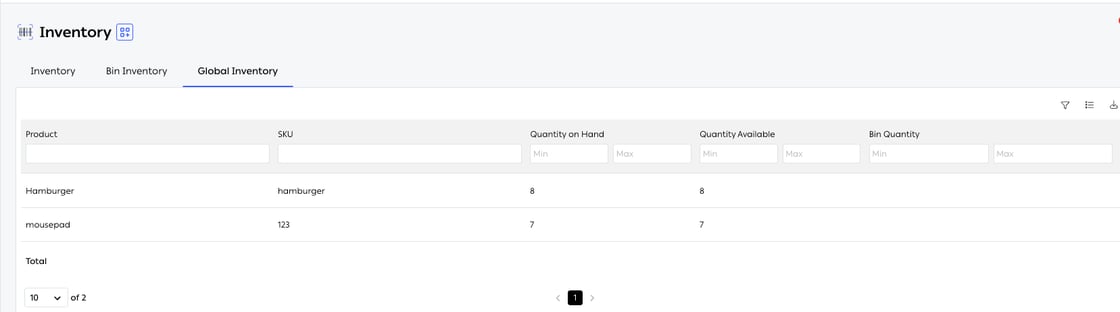
Fig. 1 — No warehouse, no branch, no Min Inventory — because none of those mean anything once the locations are added together.
Stock reservation
Availability drops the moment an order is placed, not when someone picks it. That is the whole mechanism behind not overselling: two customers cannot both be promised the last unit, because the first one took it out of the available pool before the second one reached checkout.
The reservation lands at the location the order was assigned to, which is what makes routing and stock a single system rather than two: choosing where to fulfill from is deciding whose availability drops. And because the reservation is held centrally, it applies across every connected storefront and marketplace at once — a unit reserved by an order from one channel is invisible to all the others.
Minimum stock and safety stock
Min Inventory is set per SKU per location. It does two jobs: it is the threshold for a low-stock alert, and — if you choose — it is the buffer held back from what your storefronts are told. See Inventory sync for the second one.Across locations
Stock is held per warehouse and per branch, and Global Inventory is the roll-up across all of them. Both views matter, for different reasons: the global figure tells you whether the business can fulfill an order at all, and the per-location figure tells you whether this location can — which is the question order routing is actually asking when it chooses where to fulfill from. With bin tracking, location resolution goes one level further, down to the individual bin. That is what makes a pick path short and a count possible; see Inbound and putaway for how bins are set up.Stock transaction logs
Every change to stock is written down. The reports live at Performance → Reports on the OTO PACK tab — alongside Orders, Shipments, OTO FLEX and Branch. Each is generated on demand with filters for warehouse, SKU and date range, and each exports.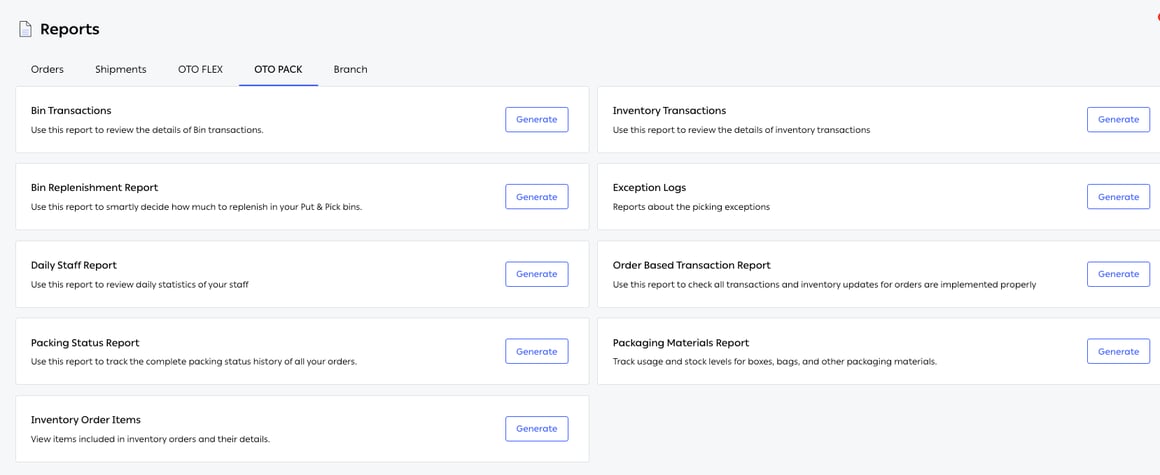
Fig. 2 — Nine reports, each with a Generate button. Between them they cover stock, bins, orders, packing and people.
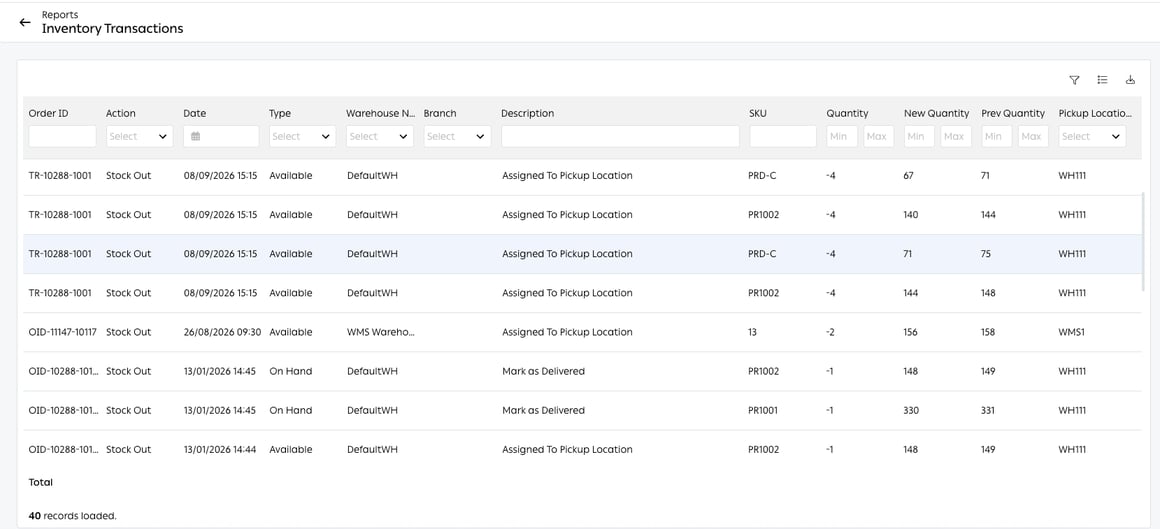
Fig. 3 — Every row is one movement, with the number before it and the number after it. Note the Type column — each line says which of the two stock figures it changed.
Keeping the levels aligned
Two maintenance actions sit in the Inventory screen’s tools for when the levels have drifted:Related
- Inventory counts — how the number gets corrected.
- Inventory sync — how it reaches your storefronts.
- The OTO PACK app — where the movements happen.