

How correction fits in
Corrections run as orders arrive, whichever route they came in by — channel sync, manual entry, bulk upload or API — so by the time Order routing evaluates a rule, the coordinates and city it reads are the corrected ones. Two corrections need no setup at all. City and district correction and phone number correction are always on, for every order, and have no toggle — they are part of how OTO ingests an order rather than something you switch on. Everything else on this page is opt-in, and a toggle takes effect only after Save.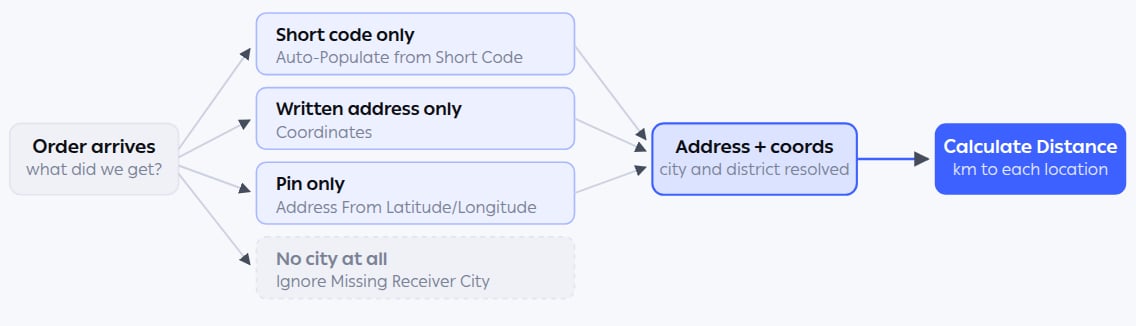
Whichever fragment of an address the customer supplied, correction fills in the rest. Distance is computed last, because it needs coordinates that the earlier steps produce.
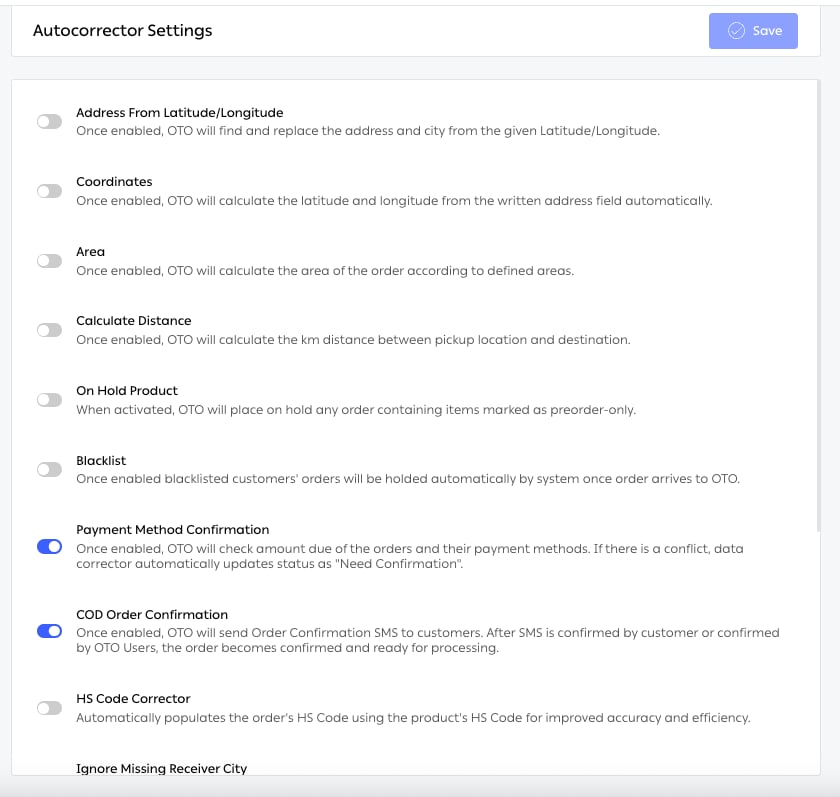
Fig. 1 — Each toggle carries its own description, so the screen is self-documenting. The first four — Address From Latitude/Longitude, Coordinates, Area and Calculate Distance — are the data-quality group.
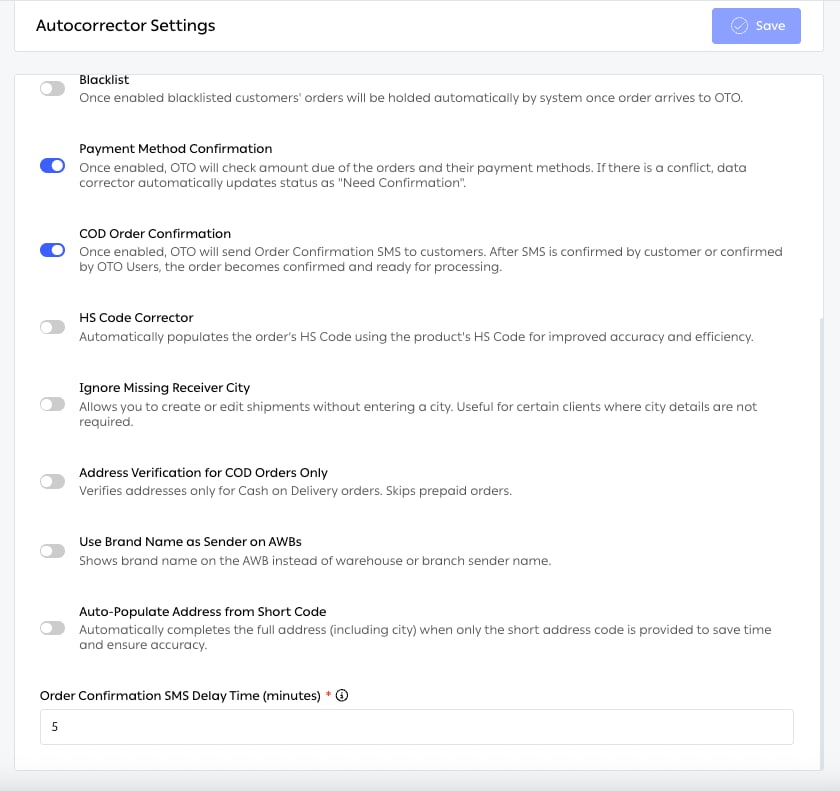
Fig. 2 — The remaining toggles, ending with Order Confirmation SMS Delay Time (minutes) — a required field that belongs to COD Order Confirmation and controls how long OTO waits before sending the confirmation SMS. Zero sends immediately.
Features
6 features in this function.Address geocoding
The Coordinates toggle. When an order arrives with a written address but no pin, OTO calculates the latitude and longitude from the address text automatically. This is the quiet prerequisite for a lot of the platform. Without coordinates, Closest Location routing has nothing to measure, distance-based pricing can’t be calculated, and the driver app has no point to navigate to.Reverse geocoding
The Address From Latitude/Longitude toggle, and the inverse case: the customer dropped a pin — from a map picker, a checkout widget, or a delivery app — but the written address is missing or wrong. OTO finds and replaces the address and the city from the coordinates given. Note that this overwrites what the customer typed. That is usually right, because a pin is a stronger signal than free text, but it is worth knowing before you switch it on.Saudi National Address validation
Saudi Arabia’s National Address gives every building a short address code — four letters and four numbers, such asRRRD2929. It is unambiguous in a way a street address in the region often isn’t.
With Auto-Populate Address from Short Code enabled, a customer who supplies only that code gets the full address completed automatically, city included. The order form also takes a Secondary Address Number for the additional National Address digits.
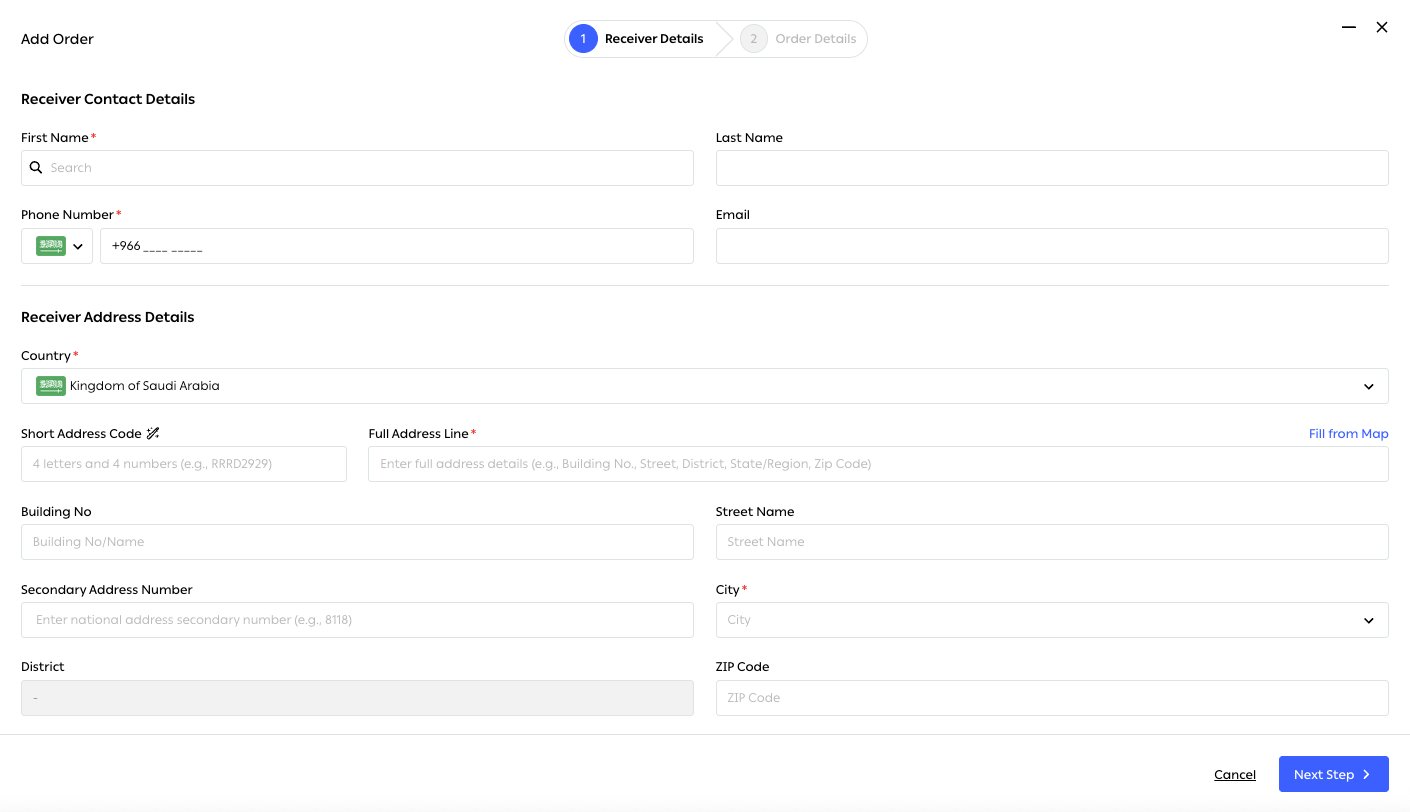
Fig. 3 — The address fields mirror the National Address structure — Short Address Code, Building No, Street Name, Secondary Address Number, District — rather than one free-text line. Fill from Map covers the case where the customer can point but not describe.
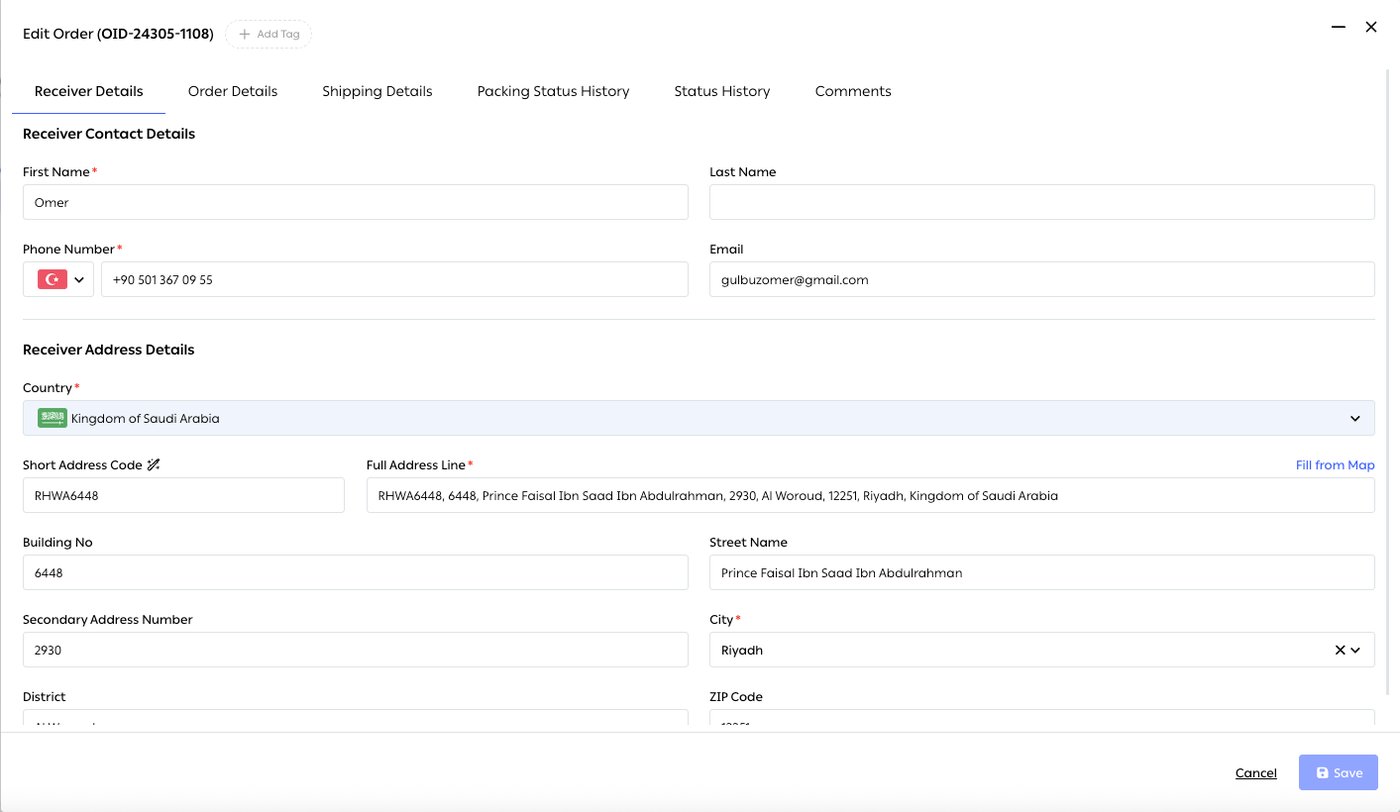
Fig. 4 — The customer supplied RHWA6448. OTO has filled the rest: building number 6448, Prince Faisal Ibn Saad Ibn Abdulrahman, secondary number 2930, Al Woroud district, Riyadh 12251 — and the Full Address Line reads as one complete address. Every one of those fields came from eight characters.
City and district correction
City is the field that most often arrives wrong — misspelled, in the wrong language, or holding a district name instead. Correction reaches it from several directions: reverse geocoding replaces the city from coordinates, and short-code expansion supplies it from the National Address. Cities can also be grouped for rule-writing. Settings → Advanced → Areas → City Group collects cities under one name — Western Region, Tier 2 cities — which can then be used as a single condition in shipping rules instead of listing cities one at a time.Ignore missing receiver city
The opposite problem. Some carriers and some clients don’t need a city at all — they work from coordinates, or from a short address code that already implies one. The Ignore Missing Receiver City toggle lets a shipment be created or edited without one, instead of blocking the order on a field nobody downstream is going to read. Leave it off if city is how you route or price; turn it on where insisting on a city creates busywork without improving delivery.Driving-distance calculation
The Calculate Distance toggle computes the distance in kilometers between the pickup location and the destination. Crucially this is driving distance, not straight-line — which in cities separated by water, a ring road or a restricted zone is a completely different number. It feeds three things: Closest Location in Order routing, distance-tier pricing in Shipping Management, and the feasibility rules that decide whether your own fleet can serve an order at all.Phone number correction
Phone numbers arrive in every shape a customer can invent — with a leading zero, without a country code, with spaces or dashes, or in local format. OTO normalises them against the order’s country so that carriers, SMS and WhatsApp all receive a number they can actually dial.Limits and prerequisites
Related
- Order sync — where the raw, uncorrected data arrives from.
- Order routing — the main consumer of corrected coordinates and distance.
- Pre-fulfillment checks — the other half of the Autocorrector screen.
- Shipping automation — uses city groups and distance when choosing a carrier.
- Branded pages — the address verification page customers use to fix their own address.