

Where to find it: Settings → Customer Notifs — Open in OTO ↗
The problem it solves
Where is my order? is the most expensive question in e-commerce. Every time it goes unanswered it becomes a support ticket, and the ticket costs more than the margin on the order. Every time it is answered badly — a carrier’s tracking page in a foreign layout, a link that dead-ends — it costs the same and the customer remembers the carrier’s brand rather than yours. There is a second, larger cost hiding behind the first. A failed delivery is usually a data problem that nobody asked about: the address was incomplete, the customer was at work, the phone number was wrong. The information needed to prevent it existed — in the customer’s head — and nothing ever asked for it.Notifications that ask rather than tell
The shape of this module is the same every time: an event triggers a message on a channel, the message carries a link, and the link opens a branded page where the customer can do something. What they do comes back into your operation as data.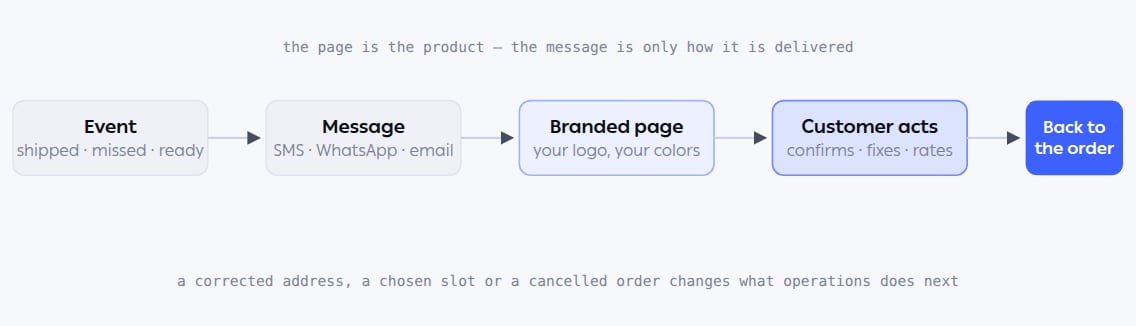
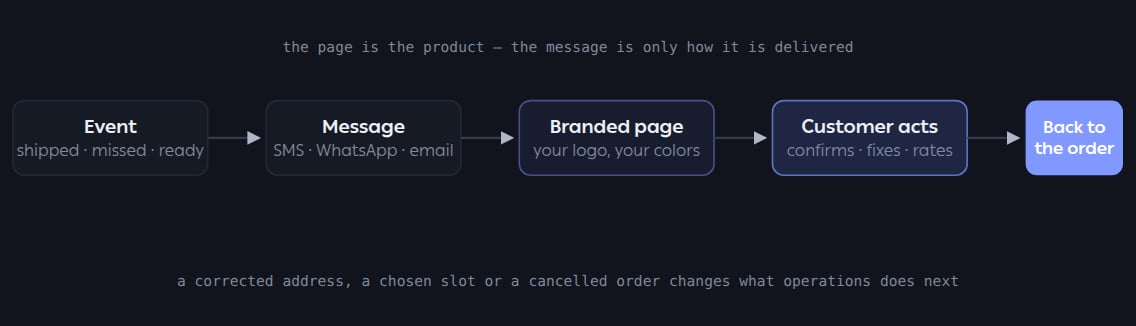
Every notification type follows this path. What differs is the event that starts it and what the page lets the customer do.
Where it lives
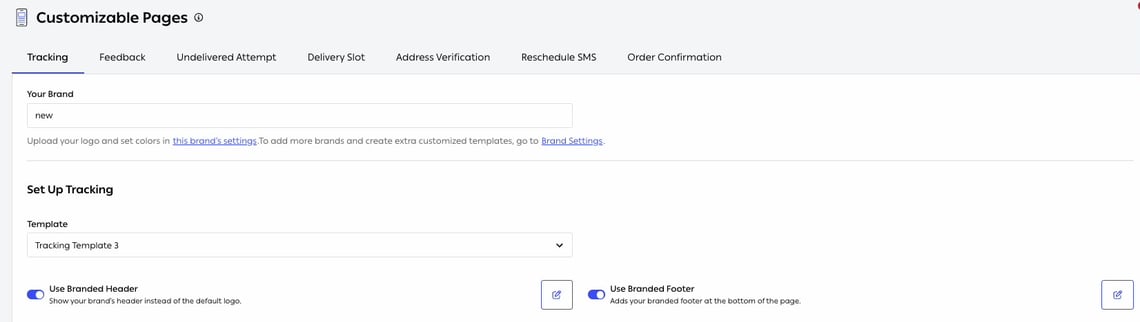
Fig. 1 — Seven tabs, one per page the customer might open. Each is configured, previewed and published on its own.
Who runs it
Functions in this module
Branded pages
10 features
SMS
5 features
2 features
1 feature
Custom workflows
1 feature
What it connects to
- Pre-fulfillment checks — the COD confirmation and address checks that use these pages.
- Delivery — the live tracking page a driver’s progress feeds.
- Return Management — the return portal is a branded page of the same family.
- Shipping & tracking — where Notify is used.