

Where to find it: Settings → Customer Notifs → Email — Open in OTO ↗
Two tabs, in order
Settings → Customer Notifs → Email carries Email Settings and Email Accounts. The accounts come first: nothing can be sent until there is an address to send it from.Email Accounts — sending as yourself
An account is your own mailbox, connected over SMTP, so the message leaves from your domain rather than a platform’s. The list shows Email, Mail Server (Host), Display Email and Display Name, and new ones are added with Add Email Account.
More than one account can be configured — support for the ones inviting a reply, a no-reply address for the rest.
Email Settings — one brand at a time
Settings work exactly as they do for SMS: choose a brand, choose the Email Account it sends from, set a Status — “Turn email notifications ON or OFF for this brand” — and then switch individual message types on or off beneath.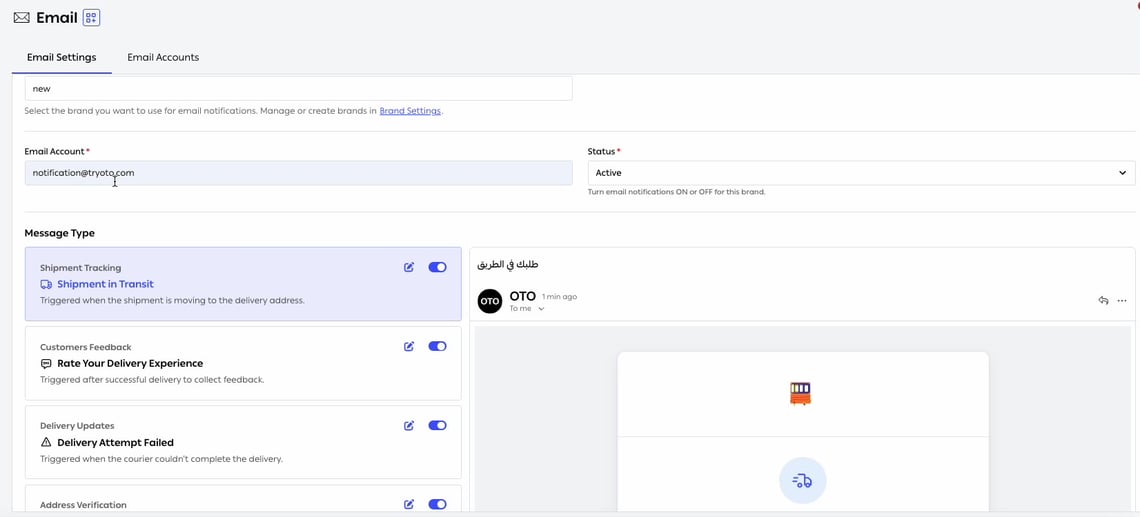
Fig. 1 — The preview on the right is the rendered email in an inbox, sender line and all — not a code view.
The message types
Email covers fewer events than SMS, deliberatelySMS carries fourteen types; email carries five. The ones email leaves out — the OTP, the click-and-collect alert, the slot reminder — are the time-critical ones, where a message sitting unread in an inbox is no use.Email takes the events where the customer benefits from detail and may want to keep the message. That division is worth preserving rather than switching everything on everywhere.
Writing the email
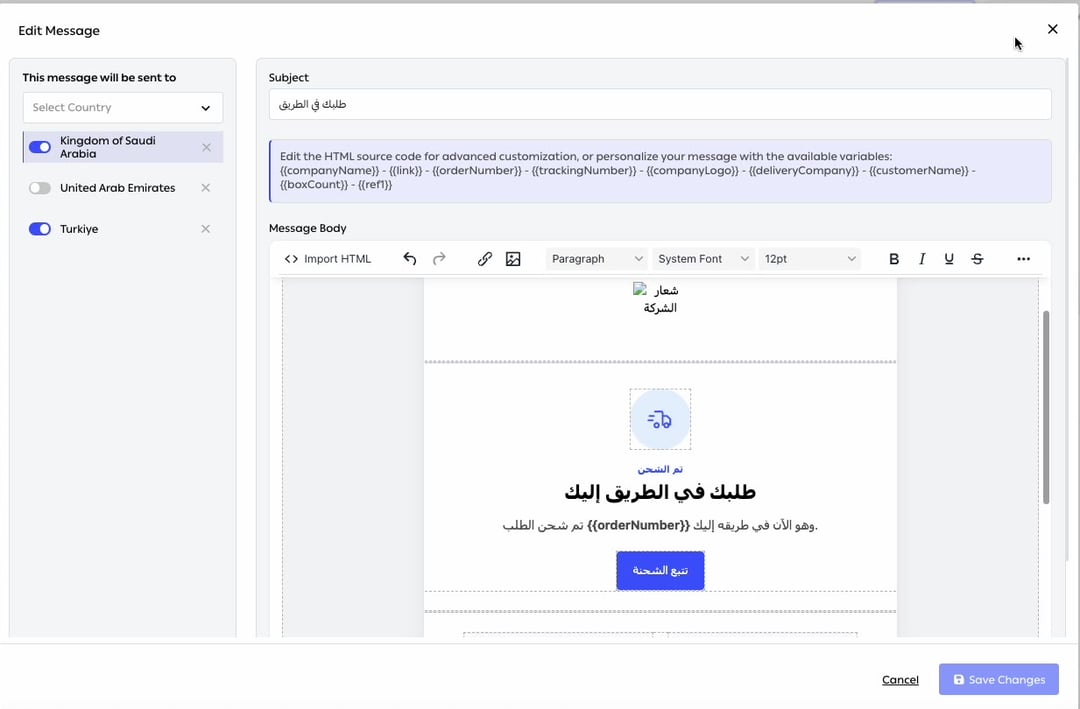
Fig. 2 — A full editor, a subject line, the variables listed above it, and per-country delivery down the left — each country with its own switch.
The variables are listed above the editor, in the product’s own words: “Edit the HTML source code for advanced customization, or personalize your message with the available variables” —
{{companyName}}, {{link}}, {{orderNumber}}, {{trackingNumber}}, {{companyLogo}}, {{deliveryCompany}}, {{customerName}}, {{boxCount}} and {{ref1}}.
What the customer receives
These are designed HTML emails rather than plain text: a branded header, a status line, the headline, the order number, a prominent call to action, then detail cards for the tracking number, the delivery company and the delivery address. They render right-to-left for Arabic without a separate template. The advantage over SMS is room. An email can show the items, the address and the order value and then offer the link, so the customer often does not need to open anything at all. Everything still links back to the same branded pages the other channels use. Send Test Email delivers the real thing before you turn it on.Which channel for which messageUrgency decides it. SMS for anything time-critical — the driver is outside, the code is needed now. Email for anything the customer may want to keep or read properly — confirmations, receipts, return instructions. Sending both for the same event is not thoroughness; it is two interruptions for one piece of news.
Related
- Branded pages — the pages emails link to.
- SMS — the same events, faster and shorter.