Send delivery updates on WhatsApp Business: connect your account, get message templates approved, send messages by hand, and set up messages for drivers.
Where to find it: Settings → Customer Notifs → Whatsapp — Open in OTO ↗
In much of the Middle East, WhatsApp is not a messaging app people also have — it is where they are. A delivery message that arrives there is read in the same thread as everything else that matters to them.
WhatsApp Business is stricter than SMS by design: you cannot send arbitrary text to a customer who has not written to you first. Messages have to be pre-approved templates. That shapes the setup into three steps.
Step
Where
What it is
1 · Connection
Add Connection
Your WhatsApp Business account. More than one can be connected — typically one per brand.
2 · Template
Whatsapp Templates
The message itself, submitted to Meta for approval.
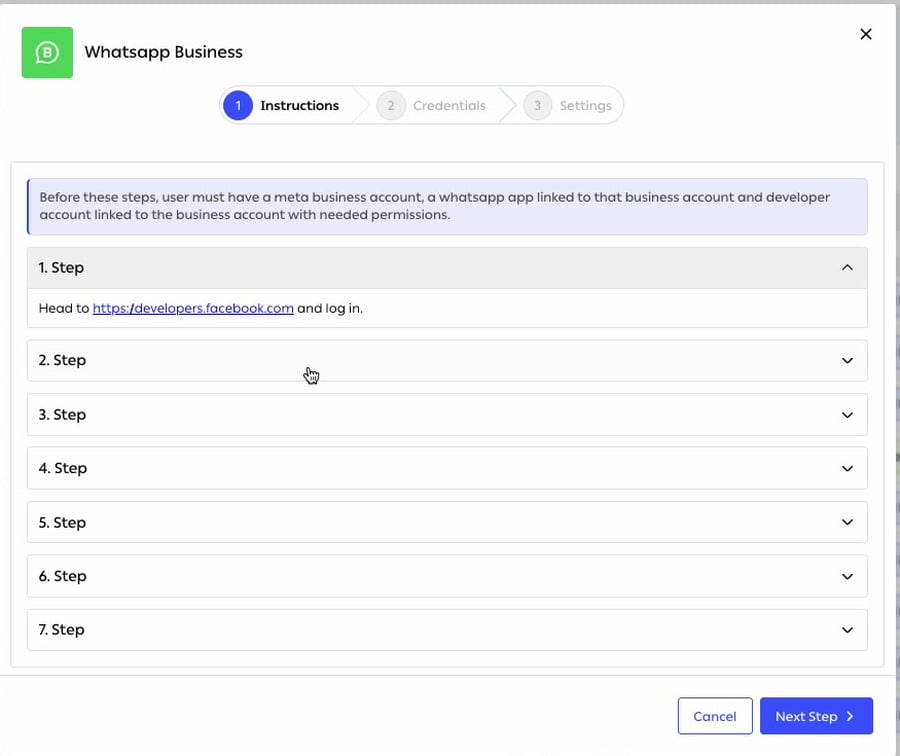
Fig. 1 — Three steps, and the first is a seven-step walkthrough of the Meta side — because that is where this usually goes wrong.
Add Connection runs as Instructions → Credentials → Settings. The instructions step states the prerequisite plainly: “user must have a meta business account, a whatsapp app linked to that business account and developer account linked to the business account with needed permissions”, then walks through seven numbered steps on Meta’s developer site.Credentials are a Whatsapp Business ID and a Whatsapp User Access Token, and there is a Verify Connection button — credentials must verify before the wizard will continue.
The setup guide is in the product for a reasonConnecting WhatsApp Business means creating a Meta business account, linking an app, linking a developer account and granting permissions — four things on someone else’s platform, none of which OTO can do for you.Putting the walkthrough inside the wizard, and refusing to continue until the credentials verify, is what stops the usual failure: a connection that looks configured, saves happily, and silently sends nothing.
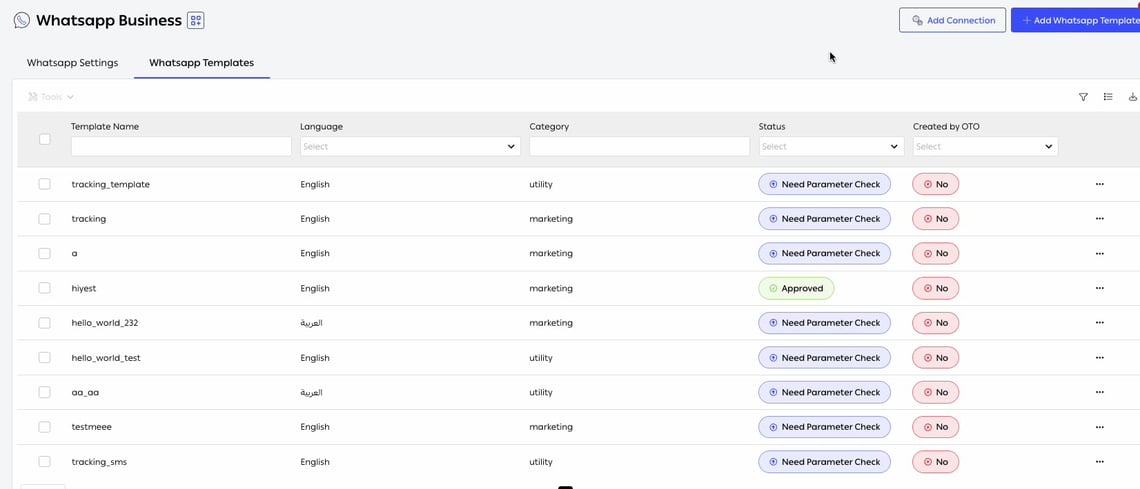
Fig. 2 — Language, category and approval status per template — and a Created by OTO column separating the ready-made ones from your own.
Template Name
Your identifier for it.
Language
One template per language — English and العربية both observed.
Category
Meta’s own classification — utility or marketing. It affects what you are allowed to send and what it costs.
Status
Approved, or Need Parameter Check while something still has to be resolved.
Created by OTO
Whether this is one of OTO’s ready-made templates or one you wrote.
Utility or marketing is not a labelMeta treats the two categories differently: utility messages are the ones tied to a transaction the customer is already in, marketing messages are promotional and carry stricter consent rules and a different price.Classifying a delivery notification as marketing is a common way to make a straightforward message harder to send and more expensive than it needed to be.
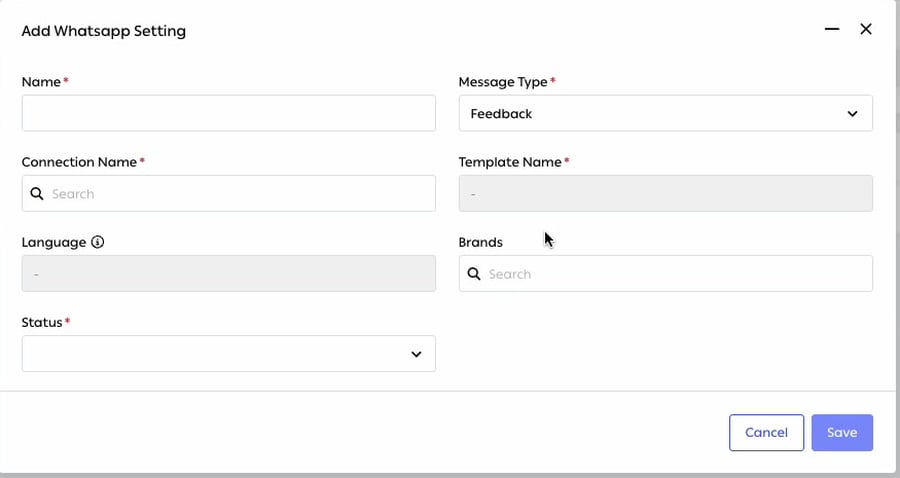
Fig. 3 — Language is read-only — it comes from the template, not from a choice made here.
Namerequired
What you call this configuration.
Message Typerequired
The event it answers.
Connection Namerequired
Which WhatsApp Business account sends it.
Template Namerequired
Which approved template carries the words.
Language
Filled in from the template.
Brands
Which brand this applies to.
Statusrequired
Active or not.
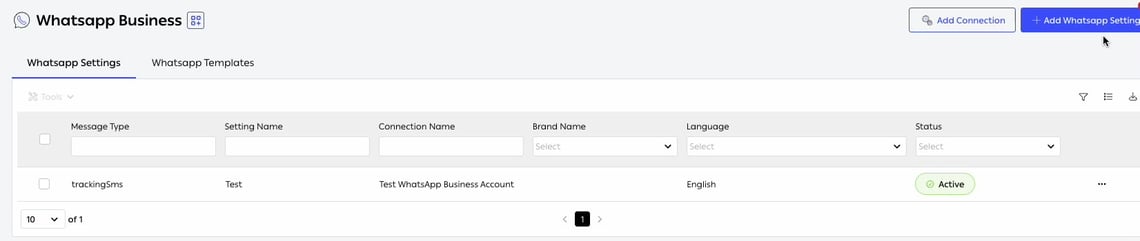
The settings list then carries one row per configuration — Message Type · Setting Name · Connection Name · Brand Name · Language · Status — so which brand says what, in which language, on which account, is a single table.
Fig. 4 — Every column filters, which matters once several brands each have their own set.
Templates need approval, and approval takes timeWhatsApp reviews every template before it can be sent, and a rejected one cannot be used at all. That makes the template library something to set up ahead of a launch rather than during it — and it means a last-minute wording change is not a five-minute job.It is also why a WhatsApp setting cannot be activated without a valid template behind it: there is nothing to fall back on.
Why it is worth the extra setupThe template approval is a real cost. What you get for it is a message in the app your customer actually lives in, with your verified business name on it, in a thread they can reply to — rather than a text from a short code they do not recognize.For the region OTO serves, that difference in how a message is received is usually larger than the difference in how it is sent.
Separately from customer notifications, OTO FLEX drivers send WhatsApp messages to customers from the driver app, using their own predefined templates. Same channel, different sender and different purpose — see Delivery.
{"docsConfig":{"theme":"mint","$schema":"https://mintlify.com/docs.json","name":"OTO Docs","description":"Product documentation for OTO, the ecommerce operations platform and shipping gateway for merchants in Saudi Arabia, the UAE and Türkiye.","colors":{"primary":"#506EFE","light":"#3D5FFF","dark":"#506EFE"},"logo":{"light":"https://mintcdn.com/oto/50MvmFcOsjmCy_H4/images/docs-logo.png?fit=max\u0026auto=format\u0026n=50MvmFcOsjmCy_H4\u0026q=85\u0026s=e77cede9643d5290bd5ff9ef3cd62084","dark":"https://mintcdn.com/oto/CC-n0HhbZXZkyIOY/images/docs-logo-dark.png?fit=max\u0026auto=format\u0026n=CC-n0HhbZXZkyIOY\u0026q=85\u0026s=0eaa761eda10edc1248ec73a7a464915"},"favicon":{"light":"https://mintcdn.com/oto/jqSnxa8fmU8MbKy9/images/oto-logo-51232.png?fit=max\u0026auto=format\u0026n=jqSnxa8fmU8MbKy9\u0026q=85\u0026s=40c563a4988902b756905551f7dfa08e","dark":"https://mintcdn.com/oto/jqSnxa8fmU8MbKy9/images/oto-logo-51232.png?fit=max\u0026auto=format\u0026n=jqSnxa8fmU8MbKy9\u0026q=85\u0026s=40c563a4988902b756905551f7dfa08e"},"background":{"color":{"light":"#F5F7F9","dark":"#111111"}},"navbar":{"links":[{"href":"https://tryoto.com","label":"Home"},{"href":"https://support.tryoto.com","label":"Help center"}],"primary":{"type":"button","label":"Dashboard","href":"https://app.tryoto.com"}},"seo":{"organization":{"id":"https://tryoto.com/#organization","name":"OTO","url":"https://tryoto.com","logo":"https://docs.tryoto.com/images/oto-logo-51232.png","sameAs":["https://www.linkedin.com/company/tryotocom","https://x.com/tryotocom","https://www.instagram.com/tryotocom","https://www.facebook.com/tryotocom","https://www.youtube.com/@tryotocom"]}},"fonts":{"family":"Ping ARLT Regular","source":"https://storage.googleapis.com/tryoto-public/public/assets/fonts/PingARLT-Regular.woff2","format":"woff2"},"contextual":{"options":["copy","view","chatgpt","claude","perplexity","mcp","cursor","vscode"],"display":"header"},"styling":{"latex":false},"navigation":{"languages":[{"language":"en","href":""},{"language":"ar","navbar":{"links":[{"href":"https://tryoto.com","label":"الرئيسية"},{"href":"https://support.tryoto.com/ar","label":"مركز المساعدة"}],"primary":{"type":"button","label":"لوحة التحكم","href":"https://app.tryoto.com"}},"href":"ar"},{"language":"tr","navbar":{"links":[{"href":"https://tryoto.com","label":"Anasayfa"},{"href":"https://support.tryoto.com/tr","label":"Yardım Merkezi"}],"primary":{"type":"button","label":"Gösterge Paneli","href":"https://app.tryoto.com"}},"href":"tr"}]}},"deployment":{"deploymentMetadataValue":{"subdomain":"oto","hasAudioNarration":false,"actualSubdomain":"oto","customDomains":["docs.tryoto.com"],"gitSource":{"type":"github","owner":"otoglobal","repo":"oto-docs","deployBranch":"master","contentDirectory":"","isPrivate":true,"mountPath":"","label":"","_id":"6ad8ce8fad82cbcc460c882d"},"chroma":{"latestBuiltDeploymentHistoryId":"6addbb84b128bc39b5e5b942","collectionId":"d72dffa9-51ec-43cf-8cd6-cc0c06f5df60","liveDeploymentHistoryId":"6addbb84b128bc39b5e5b942","schemaVersion":"v3"},"feedback":{"thumbs":false},"entitlements":{"AI_CHAT":{"status":"ENABLED"},"WEB_MCP":{"status":"ENABLED"},"NARRATION":{"status":"ENABLED"}},"buildId":"6addbb84b128bc39b5e5b942","clientVersion":"0.0.3966","searchFilterCounts":[{"language":"ar","tag":"الأنظمة","count":43},{"language":"en","tag":"Modules","count":43},{"language":"tr","tag":"Modüller","count":43},{"language":"ar","tag":"عمليات الربط","count":8},{"language":"en","tag":"Integrations","count":8},{"language":"tr","tag":"Entegrasyonlar","count":8},{"language":"ar","tag":"المطورون","count":6},{"language":"ar","tag":"البدء","count":6},{"language":"ar","tag":"إشعارات العملاء","count":6},{"language":"ar","tag":"إدارة المخزون","count":6},{"language":"ar","tag":"OMS متعدد القنوات","count":6},{"language":"en","tag":"Developers","count":6},{"language":"en","tag":"Get started","count":6},{"language":"en","tag":"Customer Notification","count":6},{"language":"en","tag":"Inventory Management","count":6},{"language":"en","tag":"Omnichannel OMS","count":6},{"language":"tr","tag":"Geliştiriciler","count":6},{"language":"tr","tag":"Başlarken","count":6},{"language":"tr","tag":"Müşteri Bildirimleri","count":6},{"language":"tr","tag":"Envanter Yönetimi","count":6},{"language":"tr","tag":"Omnichannel OMS","count":6},{"language":"ar","tag":"OTO FLEX","count":5},{"language":"ar","tag":"إدارة الشحن","count":5},{"language":"ar","tag":"إدارة المستودعات","count":5},{"language":"en","tag":"OTO FLEX","count":5},{"language":"en","tag":"Shipping Management","count":5},{"language":"en","tag":"Warehouse Management","count":5},{"language":"tr","tag":"OTO FLEX","count":5},{"language":"tr","tag":"Kargo Yönetimi","count":5},{"language":"tr","tag":"Depo Yönetimi","count":5}]},"assistantConfig":{"enableAskAiButton":false,"enableStarterQuestions":false,"enableContextualStarterQuestions":false,"enableAskAiSearchBar":true},"hasChatPermissions":false,"hasWebMcpPermissions":true,"toggles":[{"name":"kill-isr","enabled":true,"variant":{"name":"disabled","enabled":false,"feature_enabled":true},"impressionData":false},{"name":"agent-mintlify-slack","enabled":true,"variant":{"name":"disabled","enabled":false,"feature_enabled":true},"impressionData":false},{"name":"editor-v7-file-tree","enabled":true,"variant":{"name":"disabled","enabled":false,"feature_enabled":true},"impressionData":false},{"name":"agent-integrations-settings","enabled":true,"variant":{"name":"disabled","enabled":false,"feature_enabled":true},"impressionData":false},{"name":"automations-pr-grouping","enabled":true,"variant":{"name":"disabled","enabled":false,"feature_enabled":true},"impressionData":false},{"name":"custom-prefix","enabled":true,"variant":{"name":"disabled","enabled":false,"feature_enabled":true},"impressionData":false},{"name":"analytics-v7","enabled":true,"variant":{"name":"disabled","enabled":false,"feature_enabled":true},"impressionData":false},{"name":"user-flows-analytics","enabled":true,"variant":{"name":"disabled","enabled":false,"feature_enabled":true},"impressionData":false},{"name":"no-publish-flow","enabled":true,"variant":{"name":"disabled","enabled":false,"feature_enabled":true},"impressionData":false},{"name":"workos-onboarding","enabled":true,"variant":{"name":"disabled","enabled":false,"feature_enabled":true},"impressionData":false},{"name":"llms-txt-v2","enabled":true,"variant":{"name":"disabled","enabled":false,"feature_enabled":true},"impressionData":false},{"name":"pause-universal-search-reconcile","enabled":true,"variant":{"name":"disabled","enabled":false,"feature_enabled":true},"impressionData":false},{"name":"snapshot-serving-live","enabled":true,"variant":{"name":"disabled","enabled":false,"feature_enabled":true},"impressionData":false},{"name":"stripTemperatureMiddleware","enabled":true,"variant":{"name":"disabled","enabled":false,"feature_enabled":true},"impressionData":false},{"name":"per-site-search-delta","enabled":true,"variant":{"name":"disabled","enabled":false,"feature_enabled":true},"impressionData":false},{"name":"support-platform-pylon-zendesk","enabled":true,"variant":{"name":"disabled","enabled":false,"feature_enabled":true},"impressionData":false},{"name":"snapshot-serving","enabled":true,"variant":{"name":"disabled","enabled":false,"feature_enabled":true},"impressionData":false},{"name":"instant-rollback","enabled":true,"variant":{"name":"disabled","enabled":false,"feature_enabled":true},"impressionData":false},{"name":"granular-notifications-server","enabled":true,"variant":{"name":"disabled","enabled":false,"feature_enabled":true},"impressionData":false},{"name":"granular-notifications","enabled":true,"variant":{"name":"disabled","enabled":false,"feature_enabled":true},"impressionData":false},{"name":"editor-private-page-search","enabled":true,"variant":{"name":"disabled","enabled":false,"feature_enabled":true},"impressionData":false},{"name":"automations-fable","enabled":true,"variant":{"name":"disabled","enabled":false,"feature_enabled":true},"impressionData":false},{"name":"fixed-ai-action-pricing","enabled":true,"variant":{"name":"disabled","enabled":false,"feature_enabled":true},"impressionData":false},{"name":"automation-resolve-merge-conflict","enabled":true,"variant":{"name":"disabled","enabled":false,"feature_enabled":true},"impressionData":false},{"name":"scoped-publishing","enabled":true,"variant":{"name":"disabled","enabled":false,"feature_enabled":true},"impressionData":false},{"name":"mintql","enabled":true,"variant":{"name":"disabled","enabled":false,"feature_enabled":true},"impressionData":false},{"name":"page-level-analytics","enabled":true,"variant":{"name":"disabled","enabled":false,"feature_enabled":true},"impressionData":false},{"name":"editor-version-history-v2","enabled":true,"variant":{"name":"disabled","enabled":false,"feature_enabled":true},"impressionData":false},{"name":"editor-nav-generations","enabled":true,"variant":{"name":"disabled","enabled":false,"feature_enabled":true},"impressionData":false},{"name":"billing-page-v2","enabled":true,"variant":{"name":"disabled","enabled":false,"feature_enabled":true},"impressionData":false},{"name":"workspace-projects","enabled":true,"variant":{"name":"disabled","enabled":false,"feature_enabled":true},"impressionData":false},{"name":"assistant-v5","enabled":true,"variant":{"name":"disabled","enabled":false,"feature_enabled":true},"impressionData":false},{"name":"byok-sep-25","enabled":true,"variant":{"name":"disabled","enabled":false,"feature_enabled":true},"impressionData":false},{"name":"fork-pr-previews","enabled":true,"variant":{"name":"disabled","enabled":false,"feature_enabled":true},"impressionData":false},{"name":"revalidation-jwt","enabled":true,"variant":{"name":"disabled","enabled":false,"feature_enabled":true},"impressionData":false},{"name":"vite-origin","enabled":true,"variant":{"name":"disabled","enabled":false,"feature_enabled":true},"impressionData":false},{"name":"editor-agent-model-picker","enabled":true,"variant":{"name":"disabled","enabled":false,"feature_enabled":true},"impressionData":false},{"name":"billing-updated-9-15","enabled":true,"variant":{"name":"disabled","enabled":false,"feature_enabled":true},"impressionData":false},{"name":"hobby-abuse-scan","enabled":true,"variant":{"name":"disabled","enabled":false,"feature_enabled":true},"impressionData":false},{"name":"dashboard-inbox","enabled":true,"variant":{"name":"disabled","enabled":false,"feature_enabled":true},"impressionData":false}],"isAtlas":false,"googleFontsInlined":false},"customCss":[{"filePath":"rtl.css","content":":is(html[data-current-path=\"/ar\"], html[data-current-path^=\"/ar/\"]) #navbar button.lg\\:hidden>div+div,:is(html[data-current-path=\"/ar\"], html[data-current-path^=\"/ar/\"]) :is(#content-area, #page-title, #header, #table-of-contents, #sidebar-content, #mobile-nav, #pagination, #footer),:is(html[data-current-path=\"/ar\"], html[data-current-path^=\"/ar/\"]) [role=menu]{direction:rtl;text-align:right}:is(html[data-current-path=\"/ar\"], html[data-current-path^=\"/ar/\"]) #content-area ul{padding-left:0;padding-right:0}:is(html[data-current-path=\"/ar\"], html[data-current-path^=\"/ar/\"]) #content-area ul>li{padding-left:0;padding-right:2rem}:is(html[data-current-path=\"/ar\"], html[data-current-path^=\"/ar/\"]) #content-area ul>li::before{left:auto;right:.5rem}:is(html[data-current-path=\"/ar\"], html[data-current-path^=\"/ar/\"]) #content-area blockquote{border-left:0;border-right:.25rem solid currentColor;padding-left:0;padding-right:1em}:is(html[data-current-path=\"/ar\"], html[data-current-path^=\"/ar/\"]) #content-area :is(table, th, td){text-align:right}:is(html[data-current-path=\"/ar\"], html[data-current-path^=\"/ar/\"]) #content-area :is(pre, code, .code-block, .code-group, .frame svg, [data-badge]){direction:ltr;unicode-bidi:isolate;text-align:left}:is(html[data-current-path=\"/ar\"], html[data-current-path^=\"/ar/\"]) #mobile-nav #localization-select-trigger svg,:is(html[data-current-path=\"/ar\"], html[data-current-path^=\"/ar/\"]) #page-context-menu.ml-auto,:is(html[data-current-path=\"/ar\"], html[data-current-path^=\"/ar/\"]) #pagination [data-component-part=pagination-next]{margin-left:0;margin-right:auto}:is(html[data-current-path=\"/ar\"], html[data-current-path^=\"/ar/\"]) #page-context-menu-button{border-radius:0 var(--radius-xl, 0.75rem) var(--radius-xl, 0.75rem) 0;border-left-width:0;border-right-width:1px}:is(html[data-current-path=\"/ar\"], html[data-current-path^=\"/ar/\"]) #page-context-menu-button+button{border-radius:var(--radius-xl, 0.75rem) 0 0 var(--radius-xl, 0.75rem)}:is(html[data-current-path=\"/ar\"], html[data-current-path^=\"/ar/\"]) #navbar button.lg\\:hidden>div+div svg,:is(html[data-current-path=\"/ar\"], html[data-current-path^=\"/ar/\"]) [role=menuitem] .font-medium>svg{scale:-1 1}@media (min-width:1024px){:is(html[data-current-path=\"/ar\"], html[data-current-path^=\"/ar/\"]):has(#page-context-menu button[aria-expanded=true]) [role=menu][data-align=end]{translate:calc(100% - var(--anchor-width, 0px)) 0;transform-origin:0 -4px}}:is(html[data-current-path=\"/ar\"], html[data-current-path^=\"/ar/\"]) #content-area em{unicode-bidi:plaintext}:is(html[data-current-path=\"/ar\"], html[data-current-path^=\"/ar/\"]) #content-area :is(h1, h2, h3, h4, h5, h6)>.absolute>a{display:none}@media (min-width:1024px){:is(html[data-current-path=\"/ar\"], html[data-current-path^=\"/ar/\"]) #content-area :is(h1, h2, h3, h4, h5, h6)>.absolute>a{display:flex;margin-left:0;translate:2.5rem 0}}:is(html[data-current-path=\"/ar\"], html[data-current-path^=\"/ar/\"]) #sidebar-content>div{padding-right:0;padding-left:2rem}:is(html[data-current-path=\"/ar\"], html[data-current-path^=\"/ar/\"]) :is(#sidebar-content, #mobile-nav) .sidebar-group-header{padding-left:0;padding-right:1rem}:is(html[data-current-path=\"/ar\"], html[data-current-path^=\"/ar/\"]) :is(#sidebar-content, #mobile-nav) :is(a, button)[style*=padding-left]{padding-left:.75rem!important;text-align:right}:is(html[data-current-path=\"/ar\"], html[data-current-path^=\"/ar/\"]) :is(#sidebar-content, #mobile-nav) :is(a, button):is([style*=\"padding-left:1rem\"], [style*=\"padding-left: 1rem\"]){padding-right:1rem}:is(html[data-current-path=\"/ar\"], html[data-current-path^=\"/ar/\"]) :is(#sidebar-content, #mobile-nav) :is(a, button):is([style*=\"padding-left:1.75rem\"], [style*=\"padding-left: 1.75rem\"]){padding-right:1.75rem}:is(html[data-current-path=\"/ar\"], html[data-current-path^=\"/ar/\"]) :is(#sidebar-content, #mobile-nav) :is(a, button):is([style*=\"padding-left:2.5rem\"], [style*=\"padding-left: 2.5rem\"]){padding-right:2.5rem}:is(html[data-current-path=\"/ar\"], html[data-current-path^=\"/ar/\"]) :is(#sidebar-content, #mobile-nav) button[aria-expanded]:not([aria-haspopup]) svg{margin-right:0;margin-left:-.125rem}:is(html[data-current-path=\"/ar\"], html[data-current-path^=\"/ar/\"]) :is(#sidebar-content, #mobile-nav) button[aria-expanded=false]:not([aria-haspopup]) svg{scale:-1 1}:is(html[data-current-path=\"/ar\"], html[data-current-path^=\"/ar/\"]) #table-of-contents a{padding-left:0;padding-right:calc(var(--toc-padding-left, 0rem) + var(--toc-focus-padding, 0rem))}:is(html[data-current-path=\"/ar\"], html[data-current-path^=\"/ar/\"]) #pagination [data-component-part=pagination-prev] svg{rotate:180deg}:is(html[data-current-path=\"/ar\"], html[data-current-path^=\"/ar/\"]) #pagination [data-component-part=pagination-next] svg{rotate:none}:is(html[data-current-path=\"/ar\"], html[data-current-path^=\"/ar/\"]) [role=dialog]:has(#topbar-cta-button){direction:rtl;text-align:right}:is(html[data-current-path=\"/ar\"], html[data-current-path^=\"/ar/\"]) [role=dialog]:has(#topbar-cta-button)>button{right:auto;left:.375rem}:is(html[data-current-path=\"/ar\"], html[data-current-path^=\"/ar/\"]) [role=dialog]:has(#topbar-cta-button) li:first-child>a{padding-left:30px;padding-right:.75rem}@media (min-width:1024px){:is(html[data-current-path=\"/ar\"], html[data-current-path^=\"/ar/\"]) #navbar{direction:rtl}:is(html[data-current-path=\"/ar\"], html[data-current-path^=\"/ar/\"]) #topbar-cta-button svg{scale:-1 1}:is(html[data-current-path=\"/ar\"], html[data-current-path^=\"/ar/\"]) div:has(>#sidebar){flex-direction:row-reverse}:is(html[data-current-path=\"/ar\"], html[data-current-path^=\"/ar/\"]) #content-container>div:has(>#content-area){flex-direction:row}:is(html[data-current-path=\"/ar\"], html[data-current-path^=\"/ar/\"]) #content-area{padding-left:.25rem;padding-right:5.7rem;margin-left:0;margin-right:-3rem}:is(html[data-current-path=\"/ar\"], html[data-current-path^=\"/ar/\"]) #table-of-contents-layout{padding-left:0;padding-right:2.5rem}}"}],"page":{"pagePath":"modules/customer-notification/whatsapp","slug":"/modules/customer-notification/whatsapp","pageMetadata":{"title":"WhatsApp notifications","sidebarTitle":"WhatsApp","description":"Send delivery updates on WhatsApp Business: connect your account, get message templates approved, send messages by hand, and set up messages for drivers.","href":"/modules/customer-notification/whatsapp"},"description":{"compiledSource":"\"use strict\";\nconst {jsx: _jsx} = arguments[0];\nconst {useMDXComponents: _provideComponents} = arguments[0];\nfunction _createMdxContent(props) {\n const _components = {\n p: \"p\",\n ..._provideComponents(),\n ...props.components\n };\n return _jsx(_components.p, {\n children: \"Send delivery updates on WhatsApp Business: connect your account, get message templates approved, send messages by hand, and set up messages for drivers.\"\n });\n}\nfunction MDXContent(props = {}) {\n const {wrapper: MDXLayout} = {\n ..._provideComponents(),\n ...props.components\n };\n return MDXLayout ? _jsx(MDXLayout, {\n ...props,\n children: _jsx(_createMdxContent, {\n ...props\n })\n }) : _createMdxContent(props);\n}\nreturn {\n default: MDXContent\n};\n","frontmatter":{},"scope":{}},"pageType":"default","mdx":{"mdxSource":{"compiledSource":"\"use strict\";const{Fragment:_Fragment,jsx:_jsx,jsxs:_jsxs}=arguments[0];const{useMDXComponents:_provideComponents}=arguments[0];function _createMdxContent(props){const _components={a:`a`,em:`em`,li:`li`,p:`p`,strong:`strong`,tbody:`tbody`,td:`td`,th:`th`,thead:`thead`,tr:`tr`,ul:`ul`,..._provideComponents(),...props.components},{Frame,Heading,Info,Note,OptimizedImage,Table,Tip,Warning}=_components;if(!Frame)_missingMdxReference(`Frame`,true);if(!Heading)_missingMdxReference(`Heading`,true);if(!Info)_missingMdxReference(`Info`,true);if(!Note)_missingMdxReference(`Note`,true);if(!OptimizedImage)_missingMdxReference(`OptimizedImage`,true);if(!Table)_missingMdxReference(`Table`,true);if(!Tip)_missingMdxReference(`Tip`,true);if(!Warning)_missingMdxReference(`Warning`,true);return _jsxs(_Fragment,{children:[_jsx(Info,{children:_jsxs(_components.p,{children:[_jsx(_components.strong,{children:`Where to find it:`}),` Settings → Customer Notifs → Whatsapp — `,_jsx(_components.a,{href:`https://app.tryoto.com/whatsapp`,children:`Open in OTO ↗`})]})}),`\n`,_jsx(_components.p,{children:`In much of the Middle East, WhatsApp is not a messaging app people also have — it is where they are. A delivery message that arrives there is read in the same thread as everything else that matters to them.`}),`\n`,_jsx(Heading,{level:`2`,id:`three-things-in-order`,children:`Three things, in order`}),`\n`,_jsx(_components.p,{children:`WhatsApp Business is stricter than SMS by design: you cannot send arbitrary text to a customer who has not written to you first. Messages have to be pre-approved templates. That shapes the setup into three steps.`}),`\n`,_jsxs(Table,{children:[_jsx(_components.thead,{children:_jsxs(_components.tr,{children:[_jsx(_components.th,{children:`Step`}),_jsx(_components.th,{children:`Where`}),_jsx(_components.th,{children:`What it is`})]})}),_jsxs(_components.tbody,{children:[_jsxs(_components.tr,{children:[_jsx(_components.td,{children:_jsx(_components.strong,{children:`1 · Connection`})}),_jsx(_components.td,{children:_jsx(_components.strong,{children:`Add Connection`})}),_jsx(_components.td,{children:`Your WhatsApp Business account. More than one can be connected — typically one per brand.`})]}),_jsxs(_components.tr,{children:[_jsx(_components.td,{children:_jsx(_components.strong,{children:`2 · Template`})}),_jsx(_components.td,{children:_jsx(_components.strong,{children:`Whatsapp Templates`})}),_jsx(_components.td,{children:`The message itself, submitted to Meta for approval.`})]}),_jsxs(_components.tr,{children:[_jsx(_components.td,{children:_jsx(_components.strong,{children:`3 · Setting`})}),_jsx(_components.td,{children:_jsx(_components.strong,{children:`Whatsapp Settings`})}),_jsx(_components.td,{children:`What ties an approved template to an event.`})]})]})]}),`\n`,_jsx(Heading,{level:`3`,id:`the-connection`,children:`The connection`}),`\n`,_jsx(Frame,{caption:`Fig. 1 — Three steps, and the first is a seven-step walkthrough of the Meta side — because that is where this usually goes wrong.`,children:_jsx(OptimizedImage,{src:`https://mintcdn.com/oto/ft-bRlLvOnJkbVoC/images/cn-15-wa-connect.png?fit=max\u0026auto=format\u0026n=ft-bRlLvOnJkbVoC\u0026q=85\u0026s=b027ebb0a81ff10d45e15e0a3733dcff`,alt:`The WhatsApp Business connection wizard`,\"data-og-width\":`900`,width:`900`,\"data-og-height\":`756`,height:`756`,\"data-path\":`images/cn-15-wa-connect.png`,\"data-optimize\":`true`,\"data-opv\":`3`,srcset:`https://mintcdn.com/oto/ft-bRlLvOnJkbVoC/images/cn-15-wa-connect.png?w=280\u0026fit=max\u0026auto=format\u0026n=ft-bRlLvOnJkbVoC\u0026q=85\u0026s=0ad1b8916c6cf2b986c06a330a993f78 280w, https://mintcdn.com/oto/ft-bRlLvOnJkbVoC/images/cn-15-wa-connect.png?w=560\u0026fit=max\u0026auto=format\u0026n=ft-bRlLvOnJkbVoC\u0026q=85\u0026s=dffeb60ed39868069229c09f56866ccb 560w, https://mintcdn.com/oto/ft-bRlLvOnJkbVoC/images/cn-15-wa-connect.png?w=840\u0026fit=max\u0026auto=format\u0026n=ft-bRlLvOnJkbVoC\u0026q=85\u0026s=05fa6cdbf79253bdf5254801fa35b24b 840w, https://mintcdn.com/oto/ft-bRlLvOnJkbVoC/images/cn-15-wa-connect.png?w=1100\u0026fit=max\u0026auto=format\u0026n=ft-bRlLvOnJkbVoC\u0026q=85\u0026s=f4f17cb602ff6035ae500978f9b10a8f 1100w, https://mintcdn.com/oto/ft-bRlLvOnJkbVoC/images/cn-15-wa-connect.png?w=1650\u0026fit=max\u0026auto=format\u0026n=ft-bRlLvOnJkbVoC\u0026q=85\u0026s=6bb17b3c8f6cae7352dc1d5a54217b97 1650w, https://mintcdn.com/oto/ft-bRlLvOnJkbVoC/images/cn-15-wa-connect.png?w=2500\u0026fit=max\u0026auto=format\u0026n=ft-bRlLvOnJkbVoC\u0026q=85\u0026s=f7518c9947942411f3c36b990645da1b 2500w`})}),`\n`,_jsxs(_components.p,{children:[_jsx(_components.strong,{children:`Add Connection`}),` runs as `,_jsx(_components.strong,{children:`Instructions → Credentials → Settings`}),`. The instructions step states the prerequisite plainly: `,_jsx(_components.em,{children:`“user must have a meta business account, a whatsapp app linked to that business account and developer account linked to the business account with needed permissions”`}),`, then walks through seven numbered steps on Meta’s developer site.`]}),`\n`,_jsxs(_components.p,{children:[`Credentials are a `,_jsx(_components.strong,{children:`Whatsapp Business ID`}),` and a `,_jsx(_components.strong,{children:`Whatsapp User Access Token`}),`, and there is a `,_jsx(_components.strong,{children:`Verify Connection`}),` button — credentials must verify before the wizard will continue.`]}),`\n`,_jsxs(Tip,{children:[_jsx(_components.p,{children:_jsx(_components.strong,{children:`The setup guide is in the product for a reason`})}),_jsx(_components.p,{children:`Connecting WhatsApp Business means creating a Meta business account, linking an app, linking a developer account and granting permissions — four things on someone else’s platform, none of which OTO can do for you.`}),_jsx(_components.p,{children:`Putting the walkthrough inside the wizard, and refusing to continue until the credentials verify, is what stops the usual failure: a connection that looks configured, saves happily, and silently sends nothing.`})]}),`\n`,_jsx(Heading,{level:`3`,id:`the-templates`,children:`The templates`}),`\n`,_jsx(Frame,{caption:`Fig. 2 — Language, category and approval status per template — and a Created by OTO column separating the ready-made ones from your own.`,children:_jsx(OptimizedImage,{src:`https://mintcdn.com/oto/YkJay8Y-1RDv8ciw/images/cn-14-wa-templates.png?fit=max\u0026auto=format\u0026n=YkJay8Y-1RDv8ciw\u0026q=85\u0026s=8946d1ba27abb1c3ae8e8021b662d47f`,alt:`The Whatsapp Templates list`,\"data-og-width\":`1140`,width:`1140`,\"data-og-height\":`489`,height:`489`,\"data-path\":`images/cn-14-wa-templates.png`,\"data-optimize\":`true`,\"data-opv\":`3`,srcset:`https://mintcdn.com/oto/YkJay8Y-1RDv8ciw/images/cn-14-wa-templates.png?w=280\u0026fit=max\u0026auto=format\u0026n=YkJay8Y-1RDv8ciw\u0026q=85\u0026s=ae44b0b813742724587860edcf898733 280w, https://mintcdn.com/oto/YkJay8Y-1RDv8ciw/images/cn-14-wa-templates.png?w=560\u0026fit=max\u0026auto=format\u0026n=YkJay8Y-1RDv8ciw\u0026q=85\u0026s=5babb35328b540efc205ee1a99f9eff9 560w, https://mintcdn.com/oto/YkJay8Y-1RDv8ciw/images/cn-14-wa-templates.png?w=840\u0026fit=max\u0026auto=format\u0026n=YkJay8Y-1RDv8ciw\u0026q=85\u0026s=385eedabfa592610b09050944fae6137 840w, https://mintcdn.com/oto/YkJay8Y-1RDv8ciw/images/cn-14-wa-templates.png?w=1100\u0026fit=max\u0026auto=format\u0026n=YkJay8Y-1RDv8ciw\u0026q=85\u0026s=444144f2970bd5cc7fc15b816cc8ed27 1100w, https://mintcdn.com/oto/YkJay8Y-1RDv8ciw/images/cn-14-wa-templates.png?w=1650\u0026fit=max\u0026auto=format\u0026n=YkJay8Y-1RDv8ciw\u0026q=85\u0026s=aa5378448795fb47f98e32cab6359040 1650w, https://mintcdn.com/oto/YkJay8Y-1RDv8ciw/images/cn-14-wa-templates.png?w=2500\u0026fit=max\u0026auto=format\u0026n=YkJay8Y-1RDv8ciw\u0026q=85\u0026s=f3bb149233a4df481b173fa5ee8793d0 2500w`})}),`\n`,_jsxs(Table,{children:[_jsx(_components.thead,{children:_jsxs(_components.tr,{children:[_jsx(_components.th,{}),_jsx(_components.th,{})]})}),_jsxs(_components.tbody,{children:[_jsxs(_components.tr,{children:[_jsx(_components.td,{children:_jsx(`strong`,{children:`Template Name`})}),_jsx(_components.td,{children:`Your identifier for it.`})]}),_jsxs(_components.tr,{children:[_jsx(_components.td,{children:_jsx(`strong`,{children:`Language`})}),_jsx(_components.td,{children:`One template per language — English and العربية both observed.`})]}),_jsxs(_components.tr,{children:[_jsx(_components.td,{children:_jsx(`strong`,{children:`Category`})}),_jsxs(_components.td,{children:[`Meta’s own classification — `,_jsx(`strong`,{children:`utility`}),` or `,_jsx(`strong`,{children:`marketing`}),`. It affects what you are allowed to send and what it costs.`]})]}),_jsxs(_components.tr,{children:[_jsx(_components.td,{children:_jsx(`strong`,{children:`Status`})}),_jsxs(_components.td,{children:[_jsx(`strong`,{children:`Approved`}),`, or `,_jsx(`strong`,{children:`Need Parameter Check`}),` while something still has to be resolved.`]})]}),_jsxs(_components.tr,{children:[_jsx(_components.td,{children:_jsx(`strong`,{children:`Created by OTO`})}),_jsx(_components.td,{children:`Whether this is one of OTO’s ready-made templates or one you wrote.`})]})]})]}),`\n`,_jsxs(Note,{children:[_jsx(_components.p,{children:_jsx(_components.strong,{children:`Utility or marketing is not a label`})}),_jsx(_components.p,{children:`Meta treats the two categories differently: utility messages are the ones tied to a transaction the customer is already in, marketing messages are promotional and carry stricter consent rules and a different price.`}),_jsx(_components.p,{children:`Classifying a delivery notification as marketing is a common way to make a straightforward message harder to send and more expensive than it needed to be.`})]}),`\n`,_jsx(Heading,{level:`3`,id:`the-setting`,children:`The setting`}),`\n`,_jsx(Frame,{caption:`Fig. 3 — Language is read-only — it comes from the template, not from a choice made here.`,children:_jsx(OptimizedImage,{src:`https://mintcdn.com/oto/YkJay8Y-1RDv8ciw/images/cn-13-wa-setting.png?fit=max\u0026auto=format\u0026n=YkJay8Y-1RDv8ciw\u0026q=85\u0026s=c9e92530277ef7e6cfdf3c2d52cc2ae5`,alt:`Adding a WhatsApp setting`,\"data-og-width\":`900`,width:`900`,\"data-og-height\":`478`,height:`478`,\"data-path\":`images/cn-13-wa-setting.png`,\"data-optimize\":`true`,\"data-opv\":`3`,srcset:`https://mintcdn.com/oto/YkJay8Y-1RDv8ciw/images/cn-13-wa-setting.png?w=280\u0026fit=max\u0026auto=format\u0026n=YkJay8Y-1RDv8ciw\u0026q=85\u0026s=a2dfd85fc2ba12e77baa4af4996f8ed8 280w, https://mintcdn.com/oto/YkJay8Y-1RDv8ciw/images/cn-13-wa-setting.png?w=560\u0026fit=max\u0026auto=format\u0026n=YkJay8Y-1RDv8ciw\u0026q=85\u0026s=6691192af27e68a401fac74b8f033227 560w, https://mintcdn.com/oto/YkJay8Y-1RDv8ciw/images/cn-13-wa-setting.png?w=840\u0026fit=max\u0026auto=format\u0026n=YkJay8Y-1RDv8ciw\u0026q=85\u0026s=0c449d110f4dc17509d82b8b66efcfdd 840w, https://mintcdn.com/oto/YkJay8Y-1RDv8ciw/images/cn-13-wa-setting.png?w=1100\u0026fit=max\u0026auto=format\u0026n=YkJay8Y-1RDv8ciw\u0026q=85\u0026s=cbb98610f7b2d9ded67c5515a52ff315 1100w, https://mintcdn.com/oto/YkJay8Y-1RDv8ciw/images/cn-13-wa-setting.png?w=1650\u0026fit=max\u0026auto=format\u0026n=YkJay8Y-1RDv8ciw\u0026q=85\u0026s=5368e7cfd7cc6594881c756ff906b49a 1650w, https://mintcdn.com/oto/YkJay8Y-1RDv8ciw/images/cn-13-wa-setting.png?w=2500\u0026fit=max\u0026auto=format\u0026n=YkJay8Y-1RDv8ciw\u0026q=85\u0026s=30b398b898edb9f07a38e2ba2f7d14be 2500w`})}),`\n`,_jsxs(Table,{children:[_jsx(_components.thead,{children:_jsxs(_components.tr,{children:[_jsx(_components.th,{}),_jsx(_components.th,{})]})}),_jsxs(_components.tbody,{children:[_jsxs(_components.tr,{children:[_jsxs(_components.td,{children:[_jsx(`strong`,{children:`Name`}),` `,_jsx(`sup`,{children:`required`})]}),_jsx(_components.td,{children:`What you call this configuration.`})]}),_jsxs(_components.tr,{children:[_jsxs(_components.td,{children:[_jsx(`strong`,{children:`Message Type`}),` `,_jsx(`sup`,{children:`required`})]}),_jsx(_components.td,{children:`The event it answers.`})]}),_jsxs(_components.tr,{children:[_jsxs(_components.td,{children:[_jsx(`strong`,{children:`Connection Name`}),` `,_jsx(`sup`,{children:`required`})]}),_jsx(_components.td,{children:`Which WhatsApp Business account sends it.`})]}),_jsxs(_components.tr,{children:[_jsxs(_components.td,{children:[_jsx(`strong`,{children:`Template Name`}),` `,_jsx(`sup`,{children:`required`})]}),_jsx(_components.td,{children:`Which approved template carries the words.`})]}),_jsxs(_components.tr,{children:[_jsx(_components.td,{children:_jsx(`strong`,{children:`Language`})}),_jsx(_components.td,{children:`Filled in from the template.`})]}),_jsxs(_components.tr,{children:[_jsx(_components.td,{children:_jsx(`strong`,{children:`Brands`})}),_jsx(_components.td,{children:`Which brand this applies to.`})]}),_jsxs(_components.tr,{children:[_jsxs(_components.td,{children:[_jsx(`strong`,{children:`Status`}),` `,_jsx(`sup`,{children:`required`})]}),_jsx(_components.td,{children:`Active or not.`})]})]})]}),`\n`,_jsxs(_components.p,{children:[`The settings list then carries one row per configuration — `,_jsx(_components.strong,{children:`Message Type · Setting Name · Connection Name · Brand Name · Language · Status`}),` — so which brand says what, in which language, on which account, is a single table.`]}),`\n`,_jsx(Frame,{caption:`Fig. 4 — Every column filters, which matters once several brands each have their own set.`,children:_jsx(OptimizedImage,{src:`https://mintcdn.com/oto/YkJay8Y-1RDv8ciw/images/cn-12-wa-settings.png?fit=max\u0026auto=format\u0026n=YkJay8Y-1RDv8ciw\u0026q=85\u0026s=23fb50e814844898cddf23a2343e5dbe`,alt:`The Whatsapp Settings list`,\"data-og-width\":`1140`,width:`1140`,\"data-og-height\":`241`,height:`241`,\"data-path\":`images/cn-12-wa-settings.png`,\"data-optimize\":`true`,\"data-opv\":`3`,srcset:`https://mintcdn.com/oto/YkJay8Y-1RDv8ciw/images/cn-12-wa-settings.png?w=280\u0026fit=max\u0026auto=format\u0026n=YkJay8Y-1RDv8ciw\u0026q=85\u0026s=c254233e9e2ed31e33bd9d405e4fb375 280w, https://mintcdn.com/oto/YkJay8Y-1RDv8ciw/images/cn-12-wa-settings.png?w=560\u0026fit=max\u0026auto=format\u0026n=YkJay8Y-1RDv8ciw\u0026q=85\u0026s=a1d4d1e4c4d7cddbd4a080e98c8575a3 560w, https://mintcdn.com/oto/YkJay8Y-1RDv8ciw/images/cn-12-wa-settings.png?w=840\u0026fit=max\u0026auto=format\u0026n=YkJay8Y-1RDv8ciw\u0026q=85\u0026s=3854e6e5d0106bba7a683b3dc32bbfed 840w, https://mintcdn.com/oto/YkJay8Y-1RDv8ciw/images/cn-12-wa-settings.png?w=1100\u0026fit=max\u0026auto=format\u0026n=YkJay8Y-1RDv8ciw\u0026q=85\u0026s=6eb7f8487996996ccad1441e0278ed23 1100w, https://mintcdn.com/oto/YkJay8Y-1RDv8ciw/images/cn-12-wa-settings.png?w=1650\u0026fit=max\u0026auto=format\u0026n=YkJay8Y-1RDv8ciw\u0026q=85\u0026s=0b254fc37064b77e3830193bf14d2d38 1650w, https://mintcdn.com/oto/YkJay8Y-1RDv8ciw/images/cn-12-wa-settings.png?w=2500\u0026fit=max\u0026auto=format\u0026n=YkJay8Y-1RDv8ciw\u0026q=85\u0026s=4f7e7497a0cedcc919634c89c5369556 2500w`})}),`\n`,_jsx(Heading,{level:`3`,id:`message-types`,children:`Message types`}),`\n`,_jsxs(Table,{children:[_jsx(_components.thead,{children:_jsxs(_components.tr,{children:[_jsx(_components.th,{}),_jsx(_components.th,{})]})}),_jsxs(_components.tbody,{children:[_jsxs(_components.tr,{children:[_jsx(_components.td,{children:_jsx(`strong`,{children:`Tracking`})}),_jsx(_components.td,{children:`Shipment updates and the tracking link.`})]}),_jsxs(_components.tr,{children:[_jsx(_components.td,{children:_jsx(`strong`,{children:`Feedback`})}),_jsx(_components.td,{children:`A request for a rating after delivery.`})]}),_jsxs(_components.tr,{children:[_jsx(_components.td,{children:_jsx(`strong`,{children:`Undelivered Attempt`})}),_jsx(_components.td,{children:`The attempt failed; here is how to reschedule.`})]}),_jsxs(_components.tr,{children:[_jsx(_components.td,{children:_jsx(`strong`,{children:`Address Verification`})}),_jsx(_components.td,{children:`Confirm or correct the delivery address.`})]}),_jsxs(_components.tr,{children:[_jsx(_components.td,{children:_jsx(`strong`,{children:`Return Request`})}),_jsx(_components.td,{children:`Start a return.`})]}),_jsxs(_components.tr,{children:[_jsx(_components.td,{children:_jsx(`strong`,{children:`Delivery OTP`})}),_jsx(_components.td,{children:`The confirmation code for handover.`})]})]})]}),`\n`,_jsxs(Warning,{children:[_jsx(_components.p,{children:_jsx(_components.strong,{children:`Templates need approval, and approval takes time`})}),_jsx(_components.p,{children:`WhatsApp reviews every template before it can be sent, and a rejected one cannot be used at all. That makes the template library something to set up ahead of a launch rather than during it — and it means a last-minute wording change is not a five-minute job.`}),_jsx(_components.p,{children:`It is also why a WhatsApp setting cannot be activated without a valid template behind it: there is nothing to fall back on.`})]}),`\n`,_jsxs(Tip,{children:[_jsx(_components.p,{children:_jsx(_components.strong,{children:`Why it is worth the extra setup`})}),_jsx(_components.p,{children:`The template approval is a real cost. What you get for it is a message in the app your customer actually lives in, with your verified business name on it, in a thread they can reply to — rather than a text from a short code they do not recognize.`}),_jsx(_components.p,{children:`For the region OTO serves, that difference in how a message is received is usually larger than the difference in how it is sent.`})]}),`\n`,_jsx(Heading,{level:`2`,id:`sending-one-by-hand`,children:`Sending one by hand`}),`\n`,_jsxs(_components.p,{children:[_jsx(_components.strong,{children:`Notify`}),` on the Shipments screen sends a WhatsApp message for a specific order, using the configured template. Unlike SMS, this is one order at a time.`]}),`\n`,_jsx(Heading,{level:`2`,id:`drivers-have-their-own`,children:`Drivers have their own`}),`\n`,_jsxs(_components.p,{children:[`Separately from customer notifications, OTO FLEX drivers send WhatsApp messages to customers from the driver app, using their own predefined templates. Same channel, different sender and different purpose — see `,_jsx(_components.a,{href:`/modules/oto-flex/delivery`,children:`Delivery`}),`.`]}),`\n`,_jsx(Heading,{level:`2`,id:`related`,children:`Related`}),`\n`,_jsxs(_components.ul,{children:[`\n`,_jsxs(_components.li,{children:[_jsx(_components.a,{href:`/modules/customer-notification/sms`,children:`SMS`}),` — the fallback when WhatsApp is not available.`]}),`\n`,_jsxs(_components.li,{children:[_jsx(_components.a,{href:`/modules/customer-notification/branded-pages`,children:`Branded pages`}),` — what the message links to.`]}),`\n`,_jsxs(_components.li,{children:[_jsx(_components.a,{href:`/modules/oto-flex/delivery`,children:`Delivery`}),` — driver-to-customer messaging.`]}),`\n`]})]})}function MDXContent(props={}){const{wrapper:MDXLayout}={..._provideComponents(),...props.components};return MDXLayout?_jsx(MDXLayout,{...props,children:_jsx(_createMdxContent,{...props})}):_createMdxContent(props)}return{default:MDXContent};function _missingMdxReference(id,component){throw new Error(`Expected `+(component?`component`:`object`)+\" `\"+id+\"` to be defined: you likely forgot to import, pass, or provide it.\")}","frontmatter":{},"scope":{"config":{},"pageMetadata":{"title":"WhatsApp notifications","sidebarTitle":"WhatsApp","description":"Send delivery updates on WhatsApp Business: connect your account, get message templates approved, send messages by hand, and set up messages for drivers.","href":"/modules/customer-notification/whatsapp"}}},"mdxSourceWithNoJs":null},"mdxExtracts":{"tableOfContents":[{"title":"Three things, in order","slug":"three-things-in-order","depth":2,"children":[{"title":"The connection","slug":"the-connection","depth":3,"children":[]},{"title":"The templates","slug":"the-templates","depth":3,"children":[]},{"title":"The setting","slug":"the-setting","depth":3,"children":[]},{"title":"Message types","slug":"message-types","depth":3,"children":[]}]},{"title":"Sending one by hand","slug":"sending-one-by-hand","depth":2,"children":[]},{"title":"Drivers have their own","slug":"drivers-have-their-own","depth":2,"children":[]},{"title":"Related","slug":"related","depth":2,"children":[]}],"codeExamples":{}},"jsLinks":["/_mintlify/custom/oto/5e4908087dc78be6/adsping.js"],"subdomain":"oto","siteName":"OTO Docs","title":"WhatsApp notifications - OTO Docs","relatedPagesConfig":{"enabled":true,"limit":3,"mode":"automatic"},"navMaps":{"firstHrefInVersion":{},"firstHrefInLanguage":{"en":{"href":"/modules/customer-notification/whatsapp","matchLevel":0},"ar":{"href":"/ar/modules/customer-notification/whatsapp","matchLevel":1},"tr":{"href":"/tr/modules/customer-notification/whatsapp","matchLevel":1}}},"lastModified":"2026-10-22T15:40:13.903Z","originalFileLocation":"modules/customer-notification/whatsapp.mdx","locale":"en"},"headHtml":"\u003cscript data-mint-head>(function(){var d=document.documentElement,p=null;if(!p){try{p=localStorage.getItem(\"isDarkMode\")}catch(e){}if(p==='true')p='dark';else if(p==='false')p='light';if(p!=='light'\u0026\u0026p!=='dark'\u0026\u0026p!=='system')p=\"system\"}var r=p==='system'?(matchMedia(\"(prefers-color-scheme: dark)\").matches?'dark':'light'):p;d.classList.remove(r==='dark'?'light':'dark');d.classList.add(r);d.setAttribute(\"data-theme-preference\",p)})();\u003c/script>\u003cmeta data-mint-head name=\"description\" content=\"Send delivery updates on WhatsApp Business: connect your account, get message templates approved, send messages by hand, and set up messages for drivers.\">\u003cmeta data-mint-head name=\"application-name\" content=\"OTO Docs\">\u003cmeta data-mint-head name=\"generator\" content=\"Mintlify\">\u003clink data-mint-head rel=\"icon\" type=\"image/png\" sizes=\"192x192\" href=\"/mintlify-assets/_mintlify/favicons/oto/S_K-Ar2SQPcQI6e_/_generated/favicon/android-chrome-192x192.png\" media=\"(prefers-color-scheme: light)\">\u003clink data-mint-head rel=\"apple-touch-icon\" type=\"image/png\" sizes=\"180x180\" href=\"/mintlify-assets/_mintlify/favicons/oto/S_K-Ar2SQPcQI6e_/_generated/favicon/apple-touch-icon.png\">\u003clink data-mint-head rel=\"icon\" type=\"image/png\" sizes=\"16x16\" href=\"/mintlify-assets/_mintlify/favicons/oto/S_K-Ar2SQPcQI6e_/_generated/favicon/favicon-16x16.png\" media=\"(prefers-color-scheme: light)\">\u003clink data-mint-head rel=\"icon\" type=\"image/png\" sizes=\"32x32\" href=\"/mintlify-assets/_mintlify/favicons/oto/S_K-Ar2SQPcQI6e_/_generated/favicon/favicon-32x32.png\" media=\"(prefers-color-scheme: light)\">\u003clink data-mint-head rel=\"shortcut icon\" type=\"image/x-icon\" href=\"/mintlify-assets/_mintlify/favicons/oto/S_K-Ar2SQPcQI6e_/_generated/favicon/favicon.ico\" media=\"(prefers-color-scheme: light)\">\u003clink data-mint-head rel=\"icon\" type=\"image/png\" sizes=\"192x192\" href=\"/mintlify-assets/_mintlify/favicons/oto/S_K-Ar2SQPcQI6e_/_generated/favicon-dark/android-chrome-192x192.png\" media=\"(prefers-color-scheme: dark)\">\u003clink data-mint-head rel=\"icon\" type=\"image/png\" sizes=\"16x16\" href=\"/mintlify-assets/_mintlify/favicons/oto/S_K-Ar2SQPcQI6e_/_generated/favicon-dark/favicon-16x16.png\" media=\"(prefers-color-scheme: dark)\">\u003clink data-mint-head rel=\"icon\" type=\"image/png\" sizes=\"32x32\" href=\"/mintlify-assets/_mintlify/favicons/oto/S_K-Ar2SQPcQI6e_/_generated/favicon-dark/favicon-32x32.png\" media=\"(prefers-color-scheme: dark)\">\u003clink data-mint-head rel=\"shortcut icon\" type=\"image/x-icon\" href=\"/mintlify-assets/_mintlify/favicons/oto/S_K-Ar2SQPcQI6e_/_generated/favicon-dark/favicon.ico\" media=\"(prefers-color-scheme: dark)\">\u003cmeta data-mint-head property=\"og:title\" content=\"WhatsApp notifications - OTO Docs\">\u003cmeta data-mint-head property=\"og:description\" content=\"Send delivery updates on WhatsApp Business: connect your account, get message templates approved, send messages by hand, and set up messages for drivers.\">\u003cmeta data-mint-head property=\"og:site_name\" content=\"OTO Docs\">\u003cmeta data-mint-head property=\"og:url\" content=\"https://docs.tryoto.com/modules/customer-notification/whatsapp\">\u003cmeta data-mint-head property=\"og:type\" content=\"website\">\u003cmeta data-mint-head property=\"og:image\" content=\"https://oto.mintlify.app/_mintlify/api/og/v2?division=Customer+Notification\u0026amp;title=WhatsApp+notifications\u0026amp;description=Send+delivery+updates+on+WhatsApp+Business%3A+connect+your+account%2C+get+message+templates+approved%2C+send+messages+by+hand%2C+and+set+up+messages+for+drivers.\u0026amp;theme=fb0540dacc0ff6c761581805\u0026amp;signature=6c6cb19c1ef9d4265c43741bec4c16e3fb6730bbf4ef0b0aea29e251b3e6448b\">\u003cmeta data-mint-head property=\"og:image:width\" content=\"1200\">\u003cmeta data-mint-head property=\"og:image:height\" content=\"630\">\u003cmeta data-mint-head name=\"twitter:card\" content=\"summary_large_image\">\u003cmeta data-mint-head name=\"twitter:title\" content=\"WhatsApp notifications - OTO Docs\">\u003cmeta data-mint-head name=\"twitter:description\" content=\"Send delivery updates on WhatsApp Business: connect your account, get message templates approved, send messages by hand, and set up messages for drivers.\">\u003cmeta data-mint-head name=\"twitter:image\" content=\"https://oto.mintlify.app/_mintlify/api/og/v2?division=Customer+Notification\u0026amp;title=WhatsApp+notifications\u0026amp;description=Send+delivery+updates+on+WhatsApp+Business%3A+connect+your+account%2C+get+message+templates+approved%2C+send+messages+by+hand%2C+and+set+up+messages+for+drivers.\u0026amp;theme=fb0540dacc0ff6c761581805\u0026amp;signature=6c6cb19c1ef9d4265c43741bec4c16e3fb6730bbf4ef0b0aea29e251b3e6448b\">\u003cmeta data-mint-head name=\"twitter:image:width\" content=\"1200\">\u003cmeta data-mint-head name=\"twitter:image:height\" content=\"630\">\u003cmeta data-mint-head name=\"msapplication-config\" content=\"/mintlify-assets/_mintlify/favicons/oto/S_K-Ar2SQPcQI6e_/_generated/favicon/browserconfig.xml\">\u003cmeta data-mint-head name=\"apple-mobile-web-app-title\" content=\"OTO Docs\">\u003cmeta data-mint-head name=\"msapplication-TileColor\" content=\"#506EFE\">\u003clink data-mint-head rel=\"canonical\" href=\"https://docs.tryoto.com/modules/customer-notification/whatsapp\">\u003clink data-mint-head rel=\"alternate\" type=\"application/xml\" href=\"/sitemap.xml\">\u003clink data-mint-head rel=\"alternate\" type=\"text/markdown\" href=\"/modules/customer-notification/whatsapp.md\">\u003clink data-mint-head rel=\"alternate\" hreflang=\"en\" href=\"https://docs.tryoto.com/modules/customer-notification/whatsapp\">\u003clink data-mint-head rel=\"alternate\" hreflang=\"ar\" href=\"https://docs.tryoto.com/ar/modules/customer-notification/whatsapp\">\u003clink data-mint-head rel=\"alternate\" hreflang=\"tr\" href=\"https://docs.tryoto.com/tr/modules/customer-notification/whatsapp\">\u003clink data-mint-head rel=\"alternate\" hreflang=\"x-default\" href=\"https://docs.tryoto.com/modules/customer-notification/whatsapp\">\u003cscript data-mint-head type=\"application/ld+json\">{\"@context\":\"https://schema.org\",\"@graph\":[{\"@type\":\"Organization\",\"@id\":\"https://tryoto.com/#organization\",\"name\":\"OTO\",\"url\":\"https://tryoto.com\",\"logo\":{\"@type\":\"ImageObject\",\"url\":\"https://docs.tryoto.com/images/oto-logo-51232.png\"},\"sameAs\":[\"https://www.linkedin.com/company/tryotocom\",\"https://x.com/tryotocom\",\"https://www.instagram.com/tryotocom\",\"https://www.facebook.com/tryotocom\",\"https://www.youtube.com/@tryotocom\"]},{\"@type\":\"WebSite\",\"@id\":\"https://docs.tryoto.com#website\",\"name\":\"OTO Docs\",\"url\":\"https://docs.tryoto.com\",\"publisher\":{\"@id\":\"https://tryoto.com/#organization\"}},{\"@type\":\"WebPage\",\"@id\":\"https://docs.tryoto.com/modules/customer-notification/whatsapp#webpage\",\"url\":\"https://docs.tryoto.com/modules/customer-notification/whatsapp\",\"name\":\"WhatsApp notifications\",\"description\":\"Send delivery updates on WhatsApp Business: connect your account, get message templates approved, send messages by hand, and set up messages for drivers.\",\"dateModified\":\"2026-10-22T15:40:13.903Z\",\"isPartOf\":{\"@id\":\"https://docs.tryoto.com#website\"},\"breadcrumb\":{\"@id\":\"https://docs.tryoto.com/modules/customer-notification/whatsapp#breadcrumb\"}},{\"@type\":\"BreadcrumbList\",\"@id\":\"https://docs.tryoto.com/modules/customer-notification/whatsapp#breadcrumb\",\"itemListElement\":[{\"@type\":\"ListItem\",\"position\":1,\"name\":\"Modules\",\"item\":\"https://docs.tryoto.com/modules/omnichannel-oms/overview\"},{\"@type\":\"ListItem\",\"position\":2,\"name\":\"Customer Notification\",\"item\":\"https://docs.tryoto.com/modules/customer-notification/overview\"},{\"@type\":\"ListItem\",\"position\":3,\"name\":\"WhatsApp notifications\",\"item\":\"https://docs.tryoto.com/modules/customer-notification/whatsapp\"}]},{\"@type\":[\"Article\",\"TechArticle\"],\"@id\":\"https://docs.tryoto.com/modules/customer-notification/whatsapp#article\",\"headline\":\"WhatsApp notifications\",\"name\":\"WhatsApp notifications\",\"description\":\"Send delivery updates on WhatsApp Business: connect your account, get message templates approved, send messages by hand, and set up messages for drivers.\",\"url\":\"https://docs.tryoto.com/modules/customer-notification/whatsapp\",\"mainEntityOfPage\":{\"@id\":\"https://docs.tryoto.com/modules/customer-notification/whatsapp#webpage\"},\"dateModified\":\"2026-10-22T15:40:13.903Z\",\"publisher\":{\"@id\":\"https://tryoto.com/#organization\"},\"isPartOf\":{\"@id\":\"https://docs.tryoto.com#website\"}}]}\u003c/script>\u003cscript data-mint-head type=\"application/ld+json\">{\"@context\":\"https://schema.org\",\"@type\":\"WebSite\",\"name\":\"OTO Docs\",\"creator\":{\"@type\":\"Organization\",\"name\":\"Mintlify\",\"url\":\"https://mintlify.com\"}}\u003c/script>","siteName":"OTO Docs","nav":{"global":null,"languages":[{"language":"en","pages":[{"group":"Get started","pages":[{"title":"Ecommerce operations platform and shipping gateway","sidebarTitle":"Home","href":""},{"title":"What is OTO","href":"/get-started/what-is-oto"},{"title":"Core concepts: orders, shipments, stock and hubs","sidebarTitle":"Core concepts","href":"/get-started/core-concepts"},{"title":"Platform architecture","href":"/get-started/architecture"},{"title":"Quick start: ship your first order with OTO","sidebarTitle":"Quick start","href":"/get-started/quickstart"},{"title":"Glossary of OTO terms","sidebarTitle":"Glossary","href":"/get-started/glossary"}]},{"group":"Modules","pages":[{"group":"Omnichannel OMS","pages":[{"title":"Omnichannel OMS","sidebarTitle":"Overview","href":"/modules/omnichannel-oms/overview"},{"title":"Order sync: how orders get into OTO","sidebarTitle":"Order Sync","href":"/modules/omnichannel-oms/order-sync"},{"title":"Order routing across warehouses and stores","sidebarTitle":"Order Routing","href":"/modules/omnichannel-oms/order-routing"},{"title":"Address and data correction","href":"/modules/omnichannel-oms/order-data-correction"},{"title":"Pre-fulfillment checks","href":"/modules/omnichannel-oms/prefulfillment"},{"title":"Order fulfillment in warehouses and stores","sidebarTitle":"Order Fulfillment","href":"/modules/omnichannel-oms/order-fulfillment"}]},{"group":"Sales Channels","pages":[{"title":"Sales Channels","sidebarTitle":"Overview","href":"/modules/sales-channels/overview"},{"title":"Connect and sync a sales channel","sidebarTitle":"Channel sync","href":"/modules/sales-channels/sync"},{"title":"Sync order status and tracking to your store","sidebarTitle":"Status and tracking updates","href":"/modules/sales-channels/updates"},{"title":"Checkout API for live shipping rates","sidebarTitle":"Checkout API","href":"/modules/sales-channels/checkout-api"}]},{"group":"Shipping Management","pages":[{"title":"Shipping Management","sidebarTitle":"Overview","href":"/modules/shipping-management/overview"},{"title":"Carrier integration and configuration","sidebarTitle":"Carrier Integration","href":"/modules/shipping-management/carrier-integration"},{"title":"Create shipments, print labels and track parcels","sidebarTitle":"Shipping \u0026 Tracking","href":"/modules/shipping-management/shipping-and-tracking"},{"title":"Shipping automation and carrier selection rules","sidebarTitle":"Shipping Automation","href":"/modules/shipping-management/shipping-automation"},{"title":"Shipping Invoices Reconciliation","href":"/modules/shipping-management/shipping-invoices-reconciliation"}]},{"group":"Return Management","pages":[{"title":"Return Management","sidebarTitle":"Overview","href":"/modules/return-management/overview"},{"title":"Return portal and customer return requests","sidebarTitle":"Customer returns","href":"/modules/return-management/customer-returns"},{"title":"Receiving and inspecting returns","sidebarTitle":"Returns receiving","href":"/modules/return-management/returns-receiving"},{"title":"Return automation rules","sidebarTitle":"Return automation","href":"/modules/return-management/return-automation"}]},{"group":"Hubs Management","pages":[{"title":"Hubs Management","sidebarTitle":"Overview","href":"/modules/hubs-management/overview"},{"title":"Add and configure warehouses and branches","sidebarTitle":"Hub configuration","href":"/modules/hubs-management/hubs-management"}]},{"group":"Customer Notification","pages":[{"title":"Customer Notification","sidebarTitle":"Overview","href":"/modules/customer-notification/overview"},{"title":"Branded tracking and confirmation pages","sidebarTitle":"Branded pages","href":"/modules/customer-notification/branded-pages"},{"title":"SMS notifications","sidebarTitle":"SMS","href":"/modules/customer-notification/sms"},{"title":"Email notifications","sidebarTitle":"Email","description":"Send order and delivery emails from your own domain: connect your mail server over SMTP, write the templates, and preview what the customer receives.","href":"/modules/customer-notification/email"},{"title":"WhatsApp notifications","sidebarTitle":"WhatsApp","href":"/modules/customer-notification/whatsapp"},{"title":"Custom notification workflows","sidebarTitle":"Custom workflows","description":"Message customers about events only your business knows about, such as a pre-order arriving in stock, by triggering notifications through a custom workflow.","href":"/modules/customer-notification/custom-workflows"}]},{"group":"Warehouse Management","pages":[{"title":"Warehouse Management","sidebarTitle":"Overview","href":"/modules/warehouse-management/overview"},{"title":"OTO PACK mobile app for warehouse staff","sidebarTitle":"The OTO PACK app","href":"/modules/warehouse-management/ops"},{"title":"Warehouse picking methods and waves","sidebarTitle":"Picking methods","href":"/modules/warehouse-management/picking-methods"},{"title":"Packing and dispatch","href":"/modules/warehouse-management/packing-dispatch"},{"title":"Inbound and putaway","href":"/modules/warehouse-management/inbound-putaway"}]},{"group":"Inventory Management","pages":[{"title":"Inventory Management","sidebarTitle":"Overview","href":"/modules/inventory-management/overview"},{"title":"Inventory tracking","href":"/modules/inventory-management/inventory-tracking"},{"title":"Inbound inventory","href":"/modules/inventory-management/inbound-inventory"},{"title":"Sync inventory to your sales channels","sidebarTitle":"Inventory sync","href":"/modules/inventory-management/inventory-sync"},{"title":"Product catalog and SKU configuration","sidebarTitle":"Product configuration","href":"/modules/inventory-management/product-configuration"},{"title":"Inventory counts in the OTO PACK app","sidebarTitle":"Inventory counts","href":"/modules/inventory-management/inventory-count"}]},{"group":"OTO FLEX","pages":[{"title":"OTO FLEX: delivery with your own drivers","sidebarTitle":"Overview","href":"/modules/oto-flex/overview"},{"title":"Driver and fleet management","sidebarTitle":"Fleet Management","href":"/modules/oto-flex/fleet-management"},{"title":"Delivery planning and driver assignment","sidebarTitle":"Planning","href":"/modules/oto-flex/planning"},{"title":"Driver pickup in OTO FLEX","sidebarTitle":"Pickup","href":"/modules/oto-flex/pickup"},{"title":"Last-mile delivery in OTO FLEX","sidebarTitle":"Delivery","href":"/modules/oto-flex/delivery"}]}]},{"group":"Integrations","pages":[{"title":"Integrations overview","href":"/integrations/overview"},{"title":"Sales channel integrations","sidebarTitle":"Sales channels","href":"/integrations/sales-channels"},{"title":"Marketplace integrations","sidebarTitle":"Marketplaces","href":"/integrations/marketplaces"},{"title":"ERP integrations","sidebarTitle":"ERP systems","href":"/integrations/erp-systems"},{"title":"POS integrations","sidebarTitle":"POS systems","href":"/integrations/pos-systems"},{"title":"Carrier integrations","sidebarTitle":"Carriers","href":"/integrations/carriers"},{"title":"SMS, email and WhatsApp providers","sidebarTitle":"Messaging providers","href":"/integrations/messaging-providers"},{"title":"Webhooks for real-time updates","sidebarTitle":"Webhooks","href":"/integrations/webhooks"}]},{"group":"Developers","pages":[{"title":"OTO API overview","sidebarTitle":"Developers overview","href":"/developers/overview"},{"title":"API authentication","sidebarTitle":"Authentication","href":"/developers/authentication"},{"title":"REST API reference","href":"/developers/rest-api-reference"},{"title":"Webhook events and payloads","sidebarTitle":"Webhook events","href":"/developers/webhook-events"},{"title":"OTO API Postman collection","sidebarTitle":"Postman collection","href":"/developers/postman-collection"},{"title":"API errors and rate limits","sidebarTitle":"Errors \u0026 rate limits","href":"/developers/errors-and-rate-limits"}]},{"group":"Platform","pages":[{"title":"Security \u0026 compliance","href":"/platform/security-and-compliance"},{"title":"Users, roles \u0026 permissions","href":"/platform/users-roles-and-permissions"},{"title":"Localization: languages, currency and time zones","sidebarTitle":"Localization","href":"/platform/localization"},{"title":"Collaboration \u0026 notifications","href":"/platform/collaboration-and-notifications"},{"title":"Platform announcements","sidebarTitle":"Announcements","href":"/platform/announcements"}]},{"group":"Pricing","pages":[{"title":"Plans, pricing and add-ons","sidebarTitle":"Plans \u0026 packaging","href":"/pricing/plans-and-packaging"}]}]},{"language":"ar","navbar":{"links":[{"href":"https://tryoto.com","label":"الرئيسية"},{"href":"https://support.tryoto.com/ar","label":"مركز المساعدة"}],"primary":{"type":"button","label":"لوحة التحكم","href":"https://app.tryoto.com"}},"pages":[{"title":"ar","href":"/ar/modules/customer-notification/whatsapp"}]},{"language":"tr","navbar":{"links":[{"href":"https://tryoto.com","label":"Anasayfa"},{"href":"https://support.tryoto.com/tr","label":"Yardım Merkezi"}],"primary":{"type":"button","label":"Gösterge Paneli","href":"https://app.tryoto.com"}},"pages":[{"title":"tr","href":"/tr/modules/customer-notification/whatsapp"}]}]},"title":"WhatsApp notifications - OTO Docs","buildId":"dpl_cadrRc5H9XQiJQbDFN5mcYRs2PAj","deploymentId":"dpl_cadrRc5H9XQiJQbDFN5mcYRs2PAj","dynamics":["07c022d89b","a74be98ba7"],"chunks":["Frame-B0bJ23PC.js","DynamicMarkdown-UGQuxDKp.js","zoom-image-lightbox-B0E5HDf_.js","lightbox-handle-r17bVUz3.js"]}