

Where to find it: OTO FLEX → Orders → Processing Orders — Open in OTO ↗
The driver’s app
Drivers work entirely in the OTO Flex app, which is organized into four sections plus a map: Orders, Tasks, Routes and History. A barcode scanner and the driver’s wallet — the COD balance they are carrying — sit in the header, reachable from anywhere.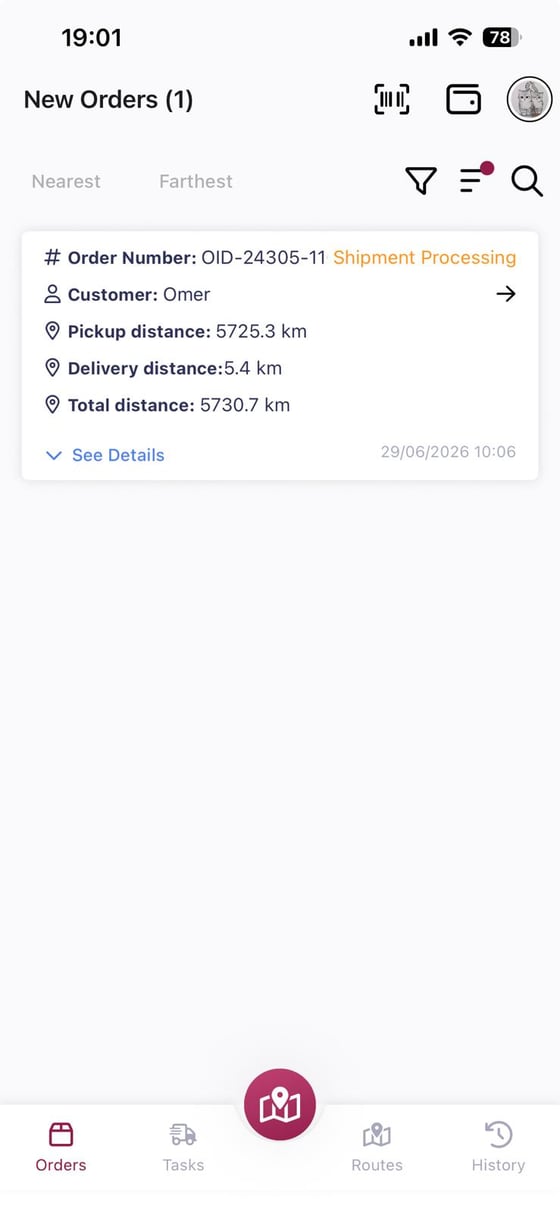
Fig. 1 — Each card shows the order, its status, the customer, and three distances: pickup, delivery and total. The driver can sort by Nearest or Farthest.
Scan and accept
Opening a pending order gives the driver everything they need to collect it. The scanner in the header — or the one inside the order — opens the phone camera; the driver scans the AWB and accepts the order. The scan is the confirmation. It ties a specific parcel to a specific driver at a specific time, rather than relying on a list being ticked.What the driver sees on the order
The order screen carries what someone standing in a loading bay actually needs:Multi-box pickups
An order shipped in several boxes is scanned box by box, each with its own barcode. A driver who scans three of four boxes has not picked up the order, and the app knows it. Without per-box scanning, a missing box is discovered at the customer’s door.Proof of pickup
Fleet settings carry a Proof of Pickup setting with two options:
Fig. 2 — Two options, because at pickup both parties are yours — there is no third party whose identity needs verifying.
Photo or barcode?They answer different questions. Barcode answers which parcel, and is the better default for a warehouse handing over many similar boxes. Photo answers in what condition, and earns its place where damage disputes are the risk — furniture, appliances, anything fragile.
Dropping at a warehouse
The order screen’s main action is a choice between two outcomes: Picked Up, or Drop at Warehouse. The second exists because a parcel in a vehicle that cannot be delivered is the worst place for it to be. Choosing to drop opens a question — what would you like to do with this shipment? — with two answers that are not the same thing at all: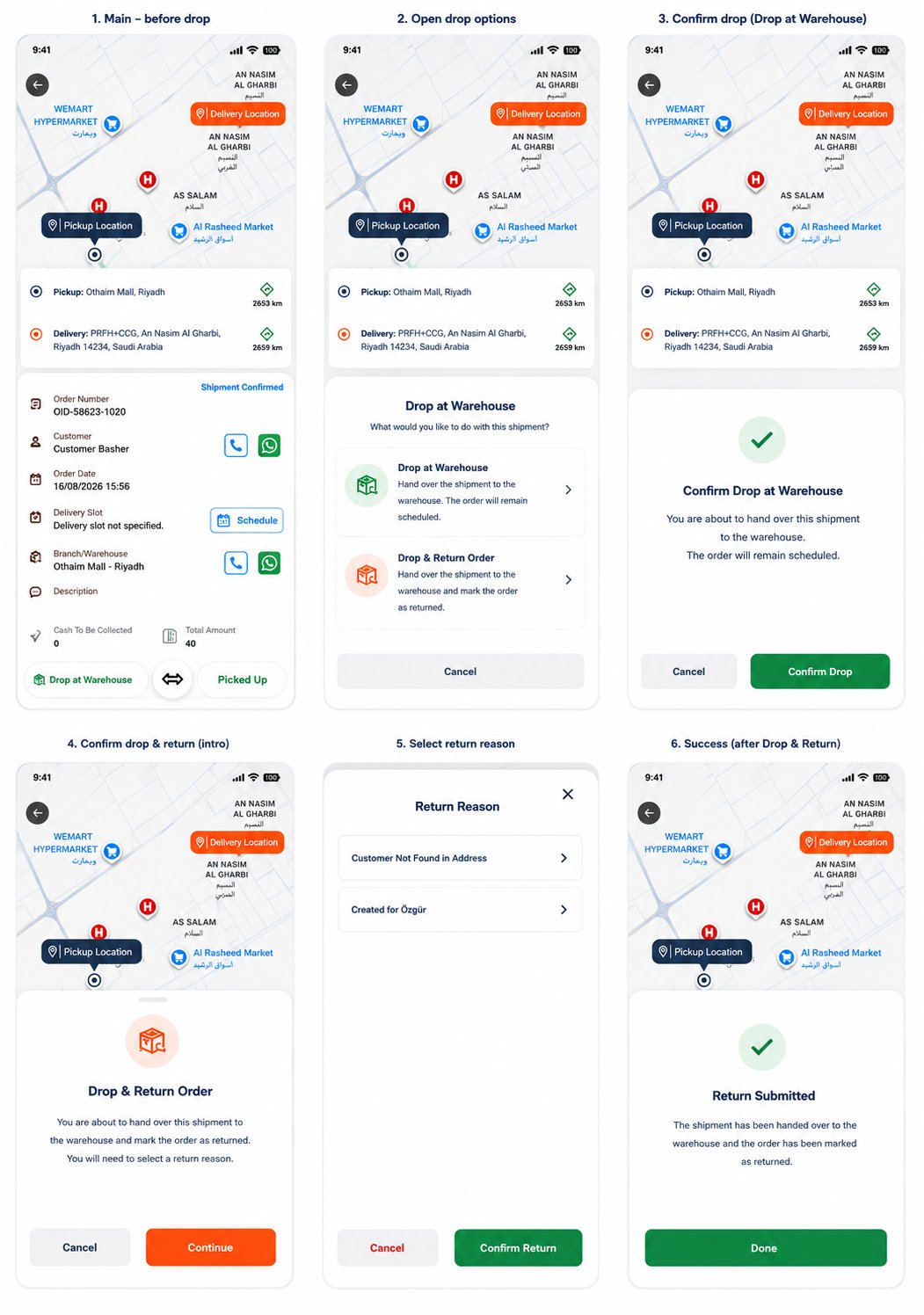
Fig. 3 — Six steps. The two paths diverge at panel 2 and only the return path asks for a reason — because only the return path ends the order.
Both paths confirm before they actEach option shows a confirmation that states the consequence in plain words before anything is committed — and the return path adds a success screen confirming that the order has been marked as returned. On a small phone screen, held one-handed in a warehouse doorway, that matters more than it would on a desktop.
Driver-to-driver handover
Parcels can be handed between drivers directly, with the transfer recorded. Shift changes and zone boundaries both produce this, and without a recorded handover the chain of custody breaks exactly where a dispute is most likely to land.Related
- Delivery — the other end of the journey, with a richer set of proof options.
- Planning — how the driver got this route.
- Returns receiving — where a dropped-and-returned order goes next.
- Order fulfillment — where the parcel and its boxes were made.