

Where to find it: Main → Integrations → Sales Channels — Open in OTO ↗
Why statuses have to be translated
OTO and your sales channel do not use the same words, and they should not. OTO tracks a shipment through a logistics lifecycle; a storefront tracks an order through a commerce one. Out for Delivery is meaningful in the first and has no equivalent in the second. Status mapping is the translation table between them: for each OTO event, what the channel should be told, and how.The mapping table
Open a connected channel’s … menu and choose Status Mapping. Each row is one rule.
Add New Row adds a rule and each row can be deleted. Mapping is per channel, so a marketplace with a strict status vocabulary and your own storefront can be driven differently from the same events. Each column header carries an information tooltip, and the dialog saves as a whole rather than row by row.
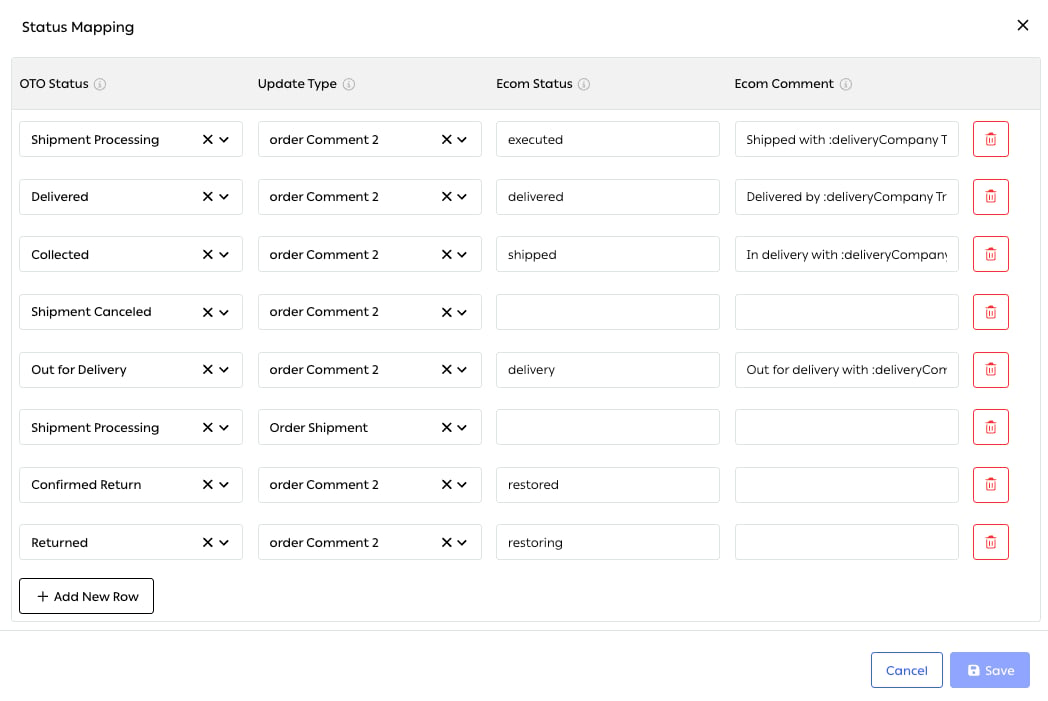
Fig. 1 — A real mapping. Note that Shipment Processing appears twice with two different update types — and that the Ecom Status column takes the channel’s own codes, not its display names.
One event, several updates
The same OTO status can appear on more than one row with different Update Types. In the mapping above, Shipment Processing appears twice: once as an order comment carrying the status and the carrier name, and once as an Order Shipment — which is what actually creates the fulfillment record on the channel. That is the mechanism behind the register’s custom triggers. One event can both tell the customer something and write a structured record, because those are different operations on the channel’s side.A row with an empty status and comment does nothingRows are allowed to carry an OTO status and an update type with both right-hand fields blank. Nothing warns you, and the mapping screen looks complete.If a status is not reaching the channel, check the row exists and that it has something to say. A blank row is indistinguishable from a missing one from the customer’s side.
Tracking links
The second thing written back is how the customer follows the parcel, and there is a real choice here.Related
- Branded pages — the tracking page itself.
- Shipping and tracking — where the statuses come from.
- Channel sync — the connection these updates travel on.